
PRICING GUIDE
QuickBooks Solopreneur Pricing (2026): Which Plan Is Right for You?
Our QuickBooks Solopreneur pricing guide breaks down all three plans (Free, Lite, and Simple Start), what each one includes, the extra costs that aren’t on the plan page, and which plan makes sense for a freelancer or one-person business. It draws on our own two weeks of hands-on testing of Lite.
By TallyBrief Editorial Team · Last updated November 2026 · 12 min read
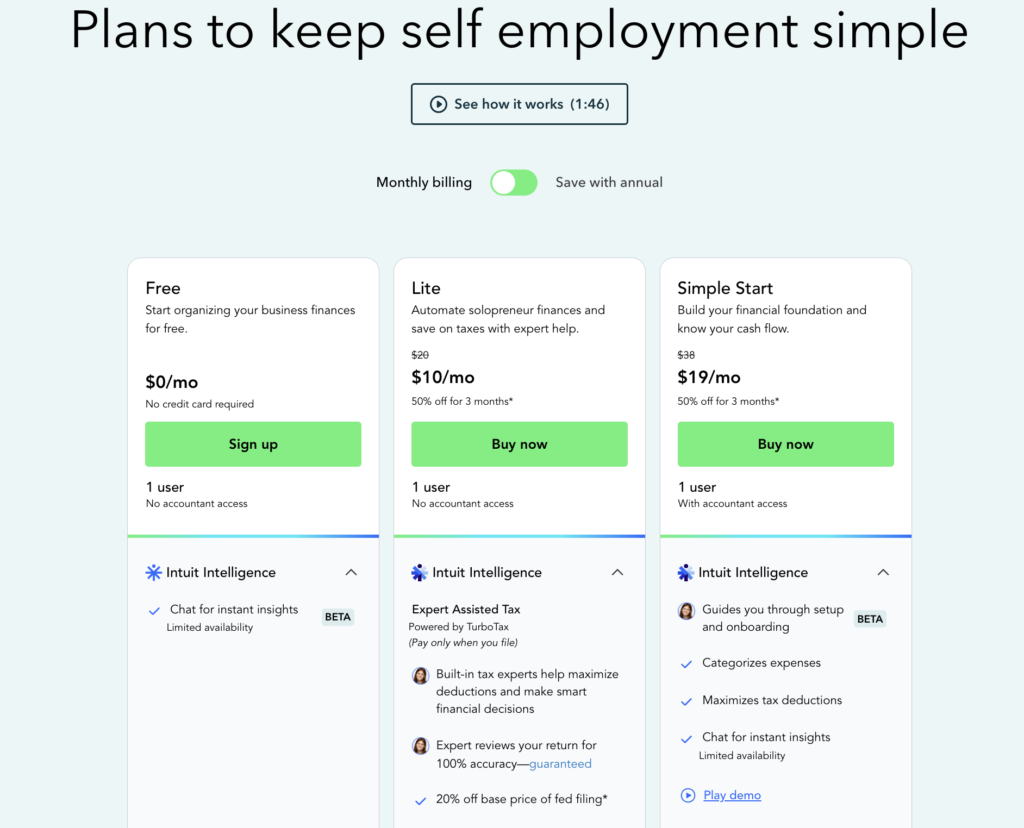
QuickBooks Solopreneur pricing page (US), captured November 2026
Quick Answer
Lite is the right plan for most freelancers. Free is really a trial, and Simple Start only pays off if your accountant needs to log in.
QuickBooks Solopreneur pricing starts at $0 for the Free plan, then $20 per month for Lite and $38 per month for Simple Start. New customers get 50% off Lite or Simple Start for the first three months, but Intuit’s main Solopreneur page doesn’t offer a free trial.
The Free plan is a good way to try QuickBooks, but it’s limited to 2 invoices a month unless you qualify for and turn on QuickBooks Payments, and it also caps receipts at 2 and mileage at 5 trips a month. We think most working freelancers will hit those limits quickly.
Lite at $20/month is the best value: unlimited invoices, receipts and mileage, the mobile app, and the tax tools that impressed us most in testing. Move to Simple Start ($38/month) only if your accountant needs their own login or you want fuller reports.
Pricing at a Glance
QuickBooks Solopreneur Pricing at a Glance
QuickBooks Solopreneur pricing covers three plans, from Free at $0 to Simple Start at $38 per month. The paid plans are billed monthly by default; paying annually saves 10%, and new customers get 50% off for their first three months.
Plan
Monthly price
Annual billing (10% off)
First 3 months (50% off)
Users
Best for
Free
$0
—
—
1 user
Trying QuickBooks before you pay
Lite
$20/month
$216/year
$10/month
1 user
Freelancers who invoice every month
Simple Start
$38/month
$410.40/year
$19/month
1 user + accountant access
Freelancers whose accountant needs to log in
Note: Figures are US list prices for QuickBooks Solopreneur, verified on Intuit’s website in November 2026. Annual billing is chosen at checkout; when we bought Lite, the first year on annual billing came to $188 with the introductory discount included. Intuit’s main Solopreneur page offers the discount rather than a free trial. Prices exclude sales tax and payment processing fees.
Who This Guide Is For
Is This Guide Right for You?
This guide is for freelancers, sole proprietors and other one-person businesses in the US who are weighing up QuickBooks Solopreneur’s plans and want to know what they’ll really pay. If you have a team or need inventory and payroll, see our QuickBooks Online pricing guide instead. For a hands-on look at the software itself, read our QuickBooks Solopreneur review.
- Freelancers deciding between the Free plan and Lite
- Self-employed people who want their books ready for tax time (Schedule C)
- Solo business owners wondering whether Simple Start is worth $18 more a month
- Former QuickBooks Self-Employed users checking what the new plans cost
How Pricing Works
How QuickBooks Solopreneur Pricing Works
QuickBooks Solopreneur charges a flat monthly fee for one business and one user. Under the hood, every plan is QuickBooks Online, so the price mostly decides your limits: how many invoices, receipts and bank connections you get, and whether an accountant can log in. Payment processing is charged separately on every plan.
Introductory Discount vs. Free Trial
New customers get 50% off Lite or Simple Start for the first three months: $10 a month for Lite and $19 for Simple Start. Intuit’s main Solopreneur page offers this discount rather than a free trial. We found this out the hard way: we started on the Free plan, expected a trial when we upgraded to Lite, and our card was charged $10 straight away. In month four, Lite goes to its full $20 a month. Simple Start is different: buy it through QuickBooks Online’s pricing page and you can choose a 30-day free trial instead of the discount.
Monthly vs. Annual Billing
Paid plans are billed monthly by default, and you can cancel anytime. Choosing annual billing at checkout takes 10% off: Lite works out to $216 a year instead of $240, and Simple Start to $410.40 instead of $456. In our checkout, Lite’s first year on annual billing came to $188, compared with $210 paying monthly.
What the Free Plan Really Includes
The Free plan needs no credit card, but its limits are tight: 2 invoices, 2 receipts and 5 mileage trips a month, 1 bank connection, 1 contractor, and only the top three reports. Invoices become unlimited if you qualify for and turn on QuickBooks Payments, but you then pay processing fees on what clients pay online. The mobile app, which we found the best part of the product, came with Lite.
It’s QuickBooks Online Under Another Name
Solopreneur isn’t a separate app. When we upgraded, checkout called the plan “QuickBooks Lite,” and our settings said “QuickBooks Online Lite”. That’s why Simple Start appears on both the Solopreneur and QuickBooks Online pricing pages at the same $38, and why you can move up to bigger QuickBooks plans later without switching software. Intuit also says Free and Lite “may be offered for a limited time”, though it promises advance notice and other plan options if either one ends. So don’t treat today’s prices as permanent.
Good to Know
Prices in this guide were checked against Intuit’s Solopreneur page in November 2026, and the plan details come from our own two weeks of testing Lite. QuickBooks changes its pricing and promotions often, so confirm the final price at checkout. See how TallyBrief tests and researches software.
Plan Comparison
QuickBooks Solopreneur Plans Compared
QuickBooks Solopreneur’s three plans build on each other: each includes everything in the one below it. The jumps that matter are unlimited invoicing and the mobile app at Lite, and accountant access and fuller reports at Simple Start.
Free
$0 per month (no credit card needed)
BEST FOR: Freelancers who want to try QuickBooks before paying, or who send only one or two invoices a month.
Free gives you the same QuickBooks software as the paid plans, with one bank connection and the top three reports (Profit and Loss, Balance Sheet and an account report). It’s a genuine way to see whether you like how QuickBooks works before you pay anything.
The catch is the limits. Two invoices a month won’t cover most working freelancers. You can make invoices unlimited by turning on QuickBooks Payments, Intuit’s built-in service that lets clients pay your invoices online by card or bank transfer, but you need to qualify and you’ll pay a fee on each online payment. Two receipts and five mileage trips a month won’t get you far either. If receipts and mileage are all you need, Expensify’s free plan scans unlimited receipts and tracks mileage (see our Expensify pricing guide). If you want a free plan to run your business on, see our ZipBooks review: its free Starter plan covers many invoicing and bookkeeping basics.
Move to Lite once you’re sending more than two invoices a month or want the mobile app.
Key reasons to choose it
- $0, with no credit card needed
- 2 invoices a month (unlimited with QuickBooks Payments)
- 2 receipts and 5 mileage trips a month
- 1 bank connection and 1 contractor
- Profit and Loss and Balance Sheet reports
- Upgrade to Lite from inside your account
Lite
$20 per month ($10/month for the first 3 months)
BEST FOR: Freelancers who invoice every month and want their books ready for tax time.
Lite is where QuickBooks Solopreneur becomes a real tool for running a business. It removes the Free plan’s monthly limits on invoices, receipts and mileage and adds the mobile app, which logged our drives automatically, read receipts in seconds and kept invoicing working when the website’s invoice screen didn’t.
It also does more than its plan page suggests. Recurring invoices, automatic payment reminders and progress invoicing all worked in our Lite account with no upgrade prompt, and the tax tools (a Schedule C-style tax summary, a deduction finder and quarterly estimates) were the highlight of our testing. Lite also includes TurboTax Expert Assisted with 20% off the base price of federal filing, paid only when you file.
The limits: one user with no accountant login, two bank connections, three contractors, and only three reports. At $20, it costs $5 a month more than ZipBooks’ Smarter plan.
Move to Simple Start when your accountant needs their own login, or you need fuller reports (such as cash flow or expense reports).
Key reasons to choose it
- Unlimited invoices, receipts and mileage trips
- Mobile app with automatic mileage tracking
- Schedule C-style tax summary and quarterly tax estimates
- Recurring invoices and automatic payment reminders
- 2 bank connections and 3 contractors
- 20% off TurboTax Expert Assisted federal filing
Simple Start
$38 per month ($19/month for the first 3 months)
BEST FOR: Freelancers whose accountant needs to log in, or who want fuller reports and cash flow history.
Simple Start is the same plan sold as QuickBooks Online’s entry tier. It includes everything in Lite except the TurboTax discount and adds accountant access, general business reports (including expenses), cash flow history, unlimited contractors and one connected sales channel, such as an online store.
That’s useful, but it nearly doubles the price for a one-person business. Many freelancers can skip it: Lite’s one-click tax summary PDF was tidy enough that we’d happily hand it to an accountant without giving them a login.
If someone else on your team needs access, look at QuickBooks Online’s bigger plans in our QuickBooks Online pricing guide.
Key reasons to choose it
- 1 user plus accountant access
- Everything in Lite
- General business reports and cash flow history
- Can add payroll and other QuickBooks services
- Unlimited contractors
- 1 connected sales channel
What It Costs
What Will QuickBooks Solopreneur Actually Cost You?
Scenario 1: The Side Hustler
Who it suits: Someone with a day job who freelances on the side, sends one or two invoices a month and mainly wants to keep business income separate from personal spending.
The Free plan fits this profile, as long as you stay within 2 invoices, 2 receipts and 5 mileage trips a month. If you qualify for and turn on QuickBooks Payments, invoices become unlimited, but each online payment carries a processing fee.
Actual cost: $0 for the plan. On $1,000 a month of invoices paid by card, processing fees would come to about $30 a month (2.99%), or $10 if clients pay by bank transfer (1%).
Bottom line: Free works for a side hustle, but once you invoice more than twice a month or want the mobile app, Lite’s $20 is money well spent.
Scenario 2: The Full-Time Freelancer
Compare: Lite, paid monthly vs. annually
Who it suits: A full-time designer, writer or consultant with several regular clients, a few business drives a month and quarterly tax payments to plan for.
Lite, monthly — $210 in year one
Three months at $10, then nine at $20. After that, it’s $240 a year. You can cancel any month, which suits you if your income is uneven or you’re still deciding whether QuickBooks is right for you.
Lite, annual — $188 in year one
Paying for the year upfront saved $22 in our checkout, and it saves $24 a year after that ($216 instead of $240). It’s worth it once you’re sure you’ll stay.
The pricing decision: Lite is the right plan either way. Pay monthly while you’re still deciding, and annually once you know QuickBooks fits how you work.
Scenario 3: The Freelancer With an Accountant
Compare: Lite vs. Simple Start
Who it suits: A freelancer who pays an accountant or bookkeeper and wants to decide whether that person needs to see the books directly.
Lite — $210 in year one
Your accountant can’t log in, but you can download a tax summary laid out by Schedule C category, plus a Profit and Loss and Balance Sheet, and send them over. For a once-a-year tax return, that’s often enough.
Simple Start — $399 in year one
Three months at $19, then nine at $38. After that, it’s $456 a year paid monthly or $410.40 billed annually. The extra $216 a year at full price buys accountant access, fuller reports and cash flow history.
The pricing decision: Pay for Simple Start only if your accountant works in your books during the year; for once-a-year tax help, Lite’s downloads do the job.
Common Mistakes
Mistakes to Avoid
Even once you understand the plans and how QuickBooks Solopreneur pricing works, a few common mistakes can leave you paying more than you expected.
Expecting a Free Trial When You Upgrade
Intuit’s main Solopreneur page offers a discount, not a free trial. When we upgraded from Free to Lite, our card was charged $10 immediately.
Better Approach
Use the Free plan as your trial: add a client, send a test invoice and import some transactions before you upgrade.
Budgeting Around the Introductory Price
The 50% discount lasts only three months. In month four, Lite doubles from $10 to $20 a month, and Simple Start from $19 to $38.
Better Approach
Compare plans at their full price and treat the first three months as a bonus.
Forgetting Payment Processing Fees
Online payments cost 2.99% for cards (including Apple Pay, PayPal and Venmo) and 1% for bank transfers, and instant deposit adds 1.75%. In our account, a setting that charges clients a flat $25 fee on bank-transfer invoices between $125 and $100,000 was also switched on from the start.
Better Approach
Add expected payment fees to your monthly cost, and check your invoice payment settings before sending your first invoice.
Upgrading Inside Your Account at Full Price
When we looked at moving from Lite to Simple Start inside our account, it was offered at the full $38 a month, with no introductory discount. Upgrade prompts also sit behind locked features like Payroll, with your card already filled in.
Better Approach
Decide which plan you need before you sign up, so the 50% offer applies to the plan you’ll actually use.
TallyBrief Recommendation
Start on Free to try it, then move to Lite. Most freelancers never need Simple Start.
For most freelancers, Lite is the QuickBooks Solopreneur plan to buy. At $20 a month, it removes the Free plan’s limits and adds the mobile app and tax tools, which were the best reasons to choose QuickBooks in our testing.
Use the Free plan as your trial, since Intuit’s main Solopreneur page doesn’t offer one. Send a test invoice, import a month of transactions and see whether you like working in QuickBooks before you pay.
Simple Start is worth the extra $18 a month only if your accountant needs to work in your books during the year, or you want fuller reports and cash flow history. If you have a team, skip Solopreneur and compare QuickBooks Online’s plans instead.
If QuickBooks feels like more software than you need, read our ZipBooks review. In our testing, ZipBooks was simpler to use, and its paid Smarter plan costs $5 a month less than Lite.
FAQ
Frequently Asked Questions
QuickBooks Solopreneur pricing has three plans: Free ($0), Lite ($20 per month) and Simple Start ($38 per month). New customers get 50% off Lite or Simple Start for the first three months, and paying annually saves 10%.
There’s a Free plan that needs no credit card, but it’s limited to 2 invoices, 2 receipts and 5 mileage trips a month, 1 bank connection and the top three reports. Invoices become unlimited if you qualify for and turn on QuickBooks Payments.
Intuit’s main Solopreneur page offers 50% off for three months rather than a trial, and when we upgraded from Free to Lite, our card was charged $10 straight away. Simple Start can come with a 30-day free trial if you buy it through QuickBooks Online’s pricing page, chosen instead of the discount. The Free plan is the simplest way to try QuickBooks before you pay.
Yes. Choosing annual billing at checkout takes 10% off: $216 a year for Lite and $410.40 for Simple Start. In our checkout, Lite’s first year on annual billing came to $188.
Solopreneur is for one-person businesses, and QuickBooks Online’s main plans are for businesses with a team. Solopreneur has three plans, Free ($0), Lite ($20) and Simple Start ($38), each with one user. QuickBooks Online runs from Simple Start ($38) to Advanced ($340), with up to 25 users and features like inventory and project tracking. Intuit treats Solopreneur as part of the QuickBooks Online lineup, which is why Simple Start appears in both. If you work alone, start with Solopreneur. If someone else needs access, see our QuickBooks Online pricing guide. You can upgrade later, but Intuit says you can’t move back to Solopreneur.
Lite includes TurboTax Expert Assisted with 20% off the base price of federal filing, and you pay only when you file. The discount applies to a specific tax year and filing deadline, so check the current terms on Intuit’s site.
Only on Simple Start. Free and Lite are single-user plans with no accountant access, though on Lite you can download a tax summary and standard reports to send to your accountant.
QuickBooks Solopreneur has replaced QuickBooks Self-Employed for new customers. If you still use Self-Employed, Intuit has a guide to switching to Solopreneur, and most of your data moves across.
Ready to Choose Your QuickBooks Solopreneur Plan?
When it comes to QuickBooks Solopreneur pricing, start on the Free plan, move to Lite once you outgrow two invoices a month, and budget at the full $20 rather than the introductory $10.
TallyBrief may earn a commission if you purchase through links on this page. This does not affect our editorial recommendations.