Home / Reviews / ZipBooks

Software Review

ZipBooks Review (2026): How Good Is It For Freelancers?

ZipBooks is an accounting and invoicing platform for freelancers and solo consultants, with a free plan that covers many basics. After hands-on testing, we found its core invoicing and bookkeeping tools surprisingly capable, though some workflows and advanced features feel less polished. 

By TallyBrief Team · Last tested September 2026 · 16 min read

ZipBooks

Accounting & Bookkeeping · Simple, beautiful, and powerful accounting software for small businesses.

ZipBooks · free + paid plans $15/month 

Quick Verdict

ZipBooks is worth considering for freelancers and solo consultants who want affordable, straightforward invoicing and bookkeeping. It met our expectations across most everyday accounting tasks, although we encountered some usability issues during testing and found its selection of native third-party integrations relatively limited.

Best For

Freelancers, solo consultants with simple accounting needs

Starting Price

$0/month (for starter plan)

Main Strength

Generous free plan features that cover most needs

Main Limitation

Limited native integrations and occasional usability issues

Free Trial / Free Plan

Free trial & free plan included

Who It's For

Who ZipBooks Is For

ZipBooks is great for freelancers and solo consultants who need invoicing, estimates, expense tracking, and bookkeeping done quickly. The day-to-day experience worked well in our testing, with the main drawbacks being fewer third-party integrations than we expected and a few accounting hurdles that we had to go through. 

Best Suited For:
Not Ideal For:
Methodology

What We Tested

Plan Tested

Starter, Smarter and Sophisticated

Testing Period

2 weeks

Platform / Device Used

Desktop web app on MacBook Air

Tasks We Completed
What We Didn't Test
Pricing

ZipBooks Pricing

ZipBooks offers 3 tiers of membership: Starter, Smarter, and Sophisticated. Smarter adds the features most freelancers would find useful, such as recurring invoices, time tracking, multiple bank connections and up to five team members. Sophisticated unlocks more advanced features, including tagging, reconciliation, advanced reporting and unlimited team members. 


Starter

Smarter (Recommended) 

Sophisticated

Starting Price

$0/month

$15/month

$35/month

Billing Options

Free

Monthly

Monthly

Users Included

Single user

Up to 5 team members

Unlimited users

Main Limits

1 bank account; no recurring billing or time tracking; limited reporting

No smart tagging, reconciliation, or advanced reporting

Full access to ZipBooks’ main accounting features

Best Suited For

Freelancers with basic invoicing and bookkeeping needs

Freelancers who want ZipBooks to be their main accounting software

Freelancers and small businesses need more advanced bookkeeping controls.

← Scroll to compare plans →

ZipBooks’ paid plans are billed monthly, with no annual-billing discount currently advertised. Its help documentation references a 30-day trial for paid plans; we couldn’t find a clearly published refund policy.

Ease of Setup

Ease of Setup

Account creation was extremely fast.  We only had to add the company name, email address, and password before reaching the main dashboard. There was no lengthy questionnaire or long accounting setup. 

Getting Started Steps
  1. Create an account with your company name, email, and password.
  2. Add basic company info and branding. 
  3. Create your first client contact.
  4. Create and send your first invoice. 

Time to First Invoice / Entry

Within 5 minutes

Core Features

Core Features

For this ZipBooks Review, we tested ZipBooks’ core features exactly how a freelancer would. Creating clients, sending invoices and estimates, entering entries, reviewing financial statements, recurring billing and time tracking.

Invoicing

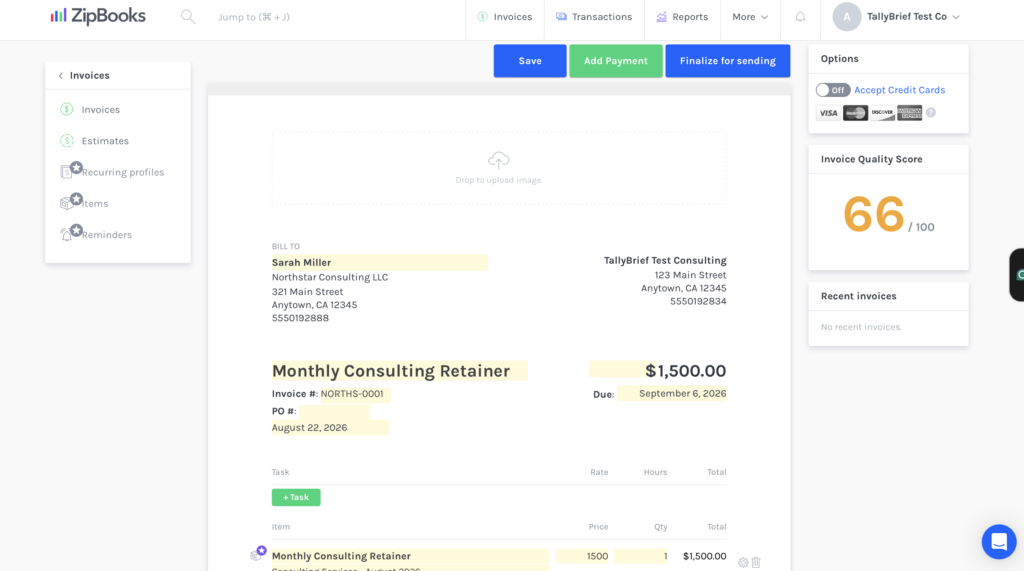
ZipBooks’ invoice editor is highly visual: you edit the invoice directly on the website, with the customer, due date, line items, terms and notes all easy to see. Creating a $1,500 fixed-price consulting invoice was straightforward, although the separate “Task” and “Item” options weren’t immediately self-explanatory; we had to work out that Items suited our fixed-price retainer, while Tasks were geared toward hourly billing. 

Creating and saving our first invoice was easy. The main snag came when we tried to send it to the customer: ZipBooks stopped us with a “Please contact customer support to verify your business,” but provided no in-app verification flow. After contacting customer support, we successfully emailed the invoice to the customer; it opened correctly for the recipient and could be downloaded as a PDF. 

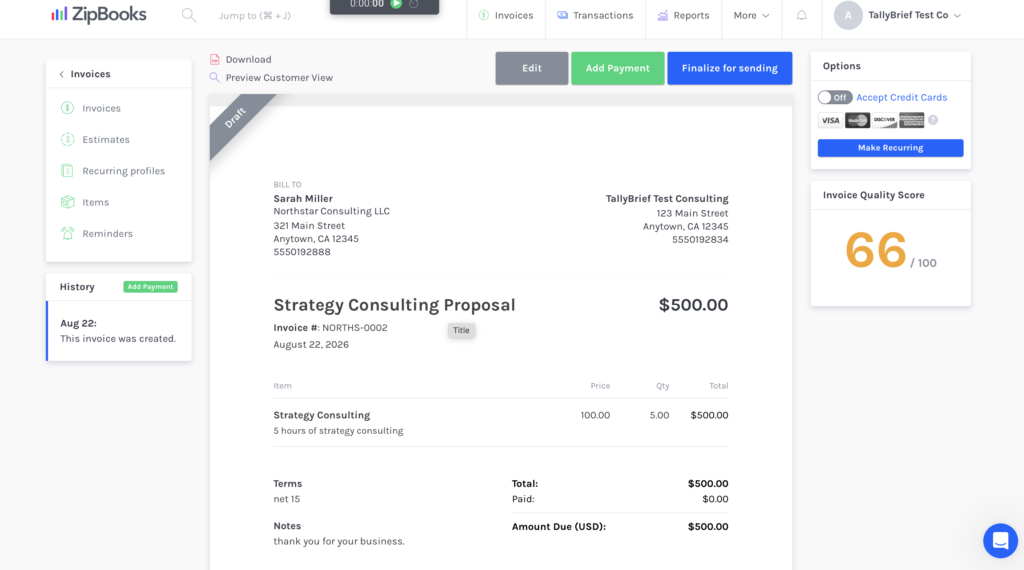
You can also add your company logo to the invoice, and it tells you how well you did at creating the invoice by looking at the scorecard on the right-hand side. 

ZipBooks invoice screen showing a completed test invoice
Advantages
Limitations

Our take: Invoicing was one of ZipBooks’ strongest features in our testing. Creating and managing a standard invoice was simple, and the minor friction we encountered didn’t meaningfully complicate the core workflow.

Financial Statements & Reporting

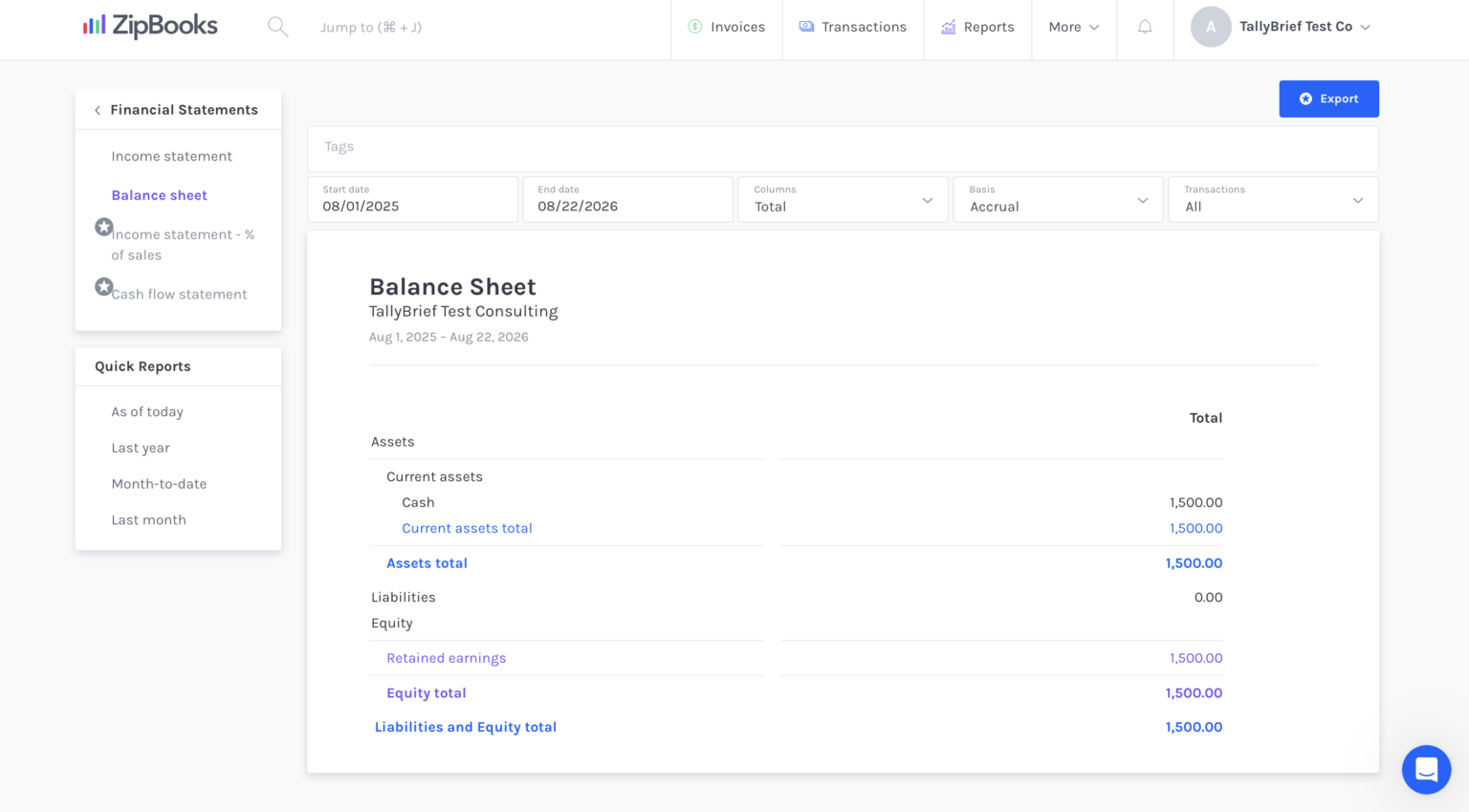
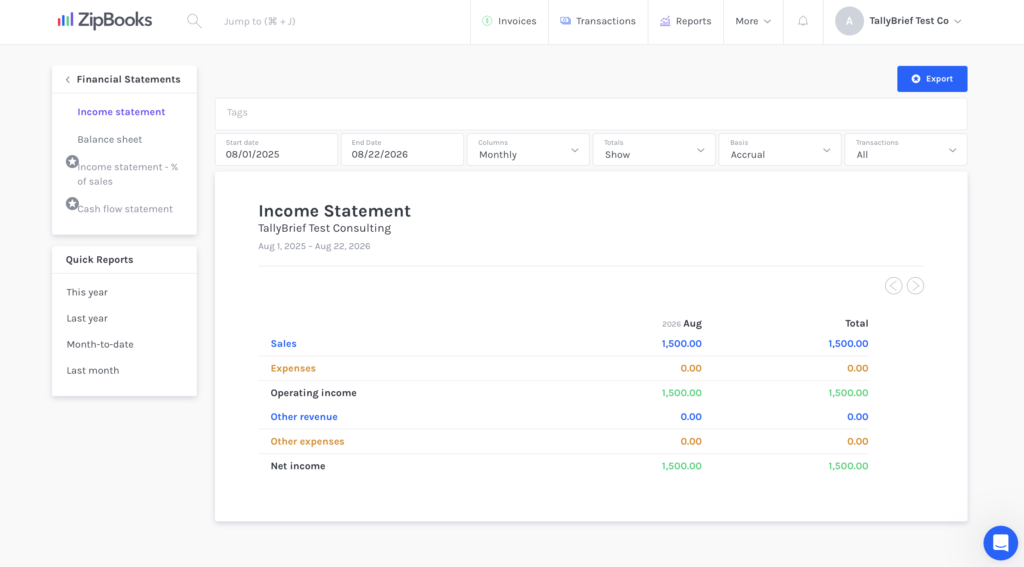
We tested ZipBooks’ financial reporting by creating and receiving a $1,500 invoice, then checking how the transaction flowed through the financial statements. ZipBooks automatically reflected the sale in the income statement and the resulting cash movement on the balance sheet, without requiring us to create journal entries or manually update the reports. 

Reporting, however, is restricted on the starter plan. While we could access core financial statements, reports such as the cash flow statement, general ledger, expense summaries, sales summaries, and invoice summaries required an upgrade. When we tried to export a financial report, ZipBooks automatically upgraded us to the Smarter plan on a 30-day trial, without asking for credit card information, which was nice. 

balance sheet review testing
income statement test
Advantages
Limitations

Our take: ZipBooks did a phenomenal job of keeping track of business activities through its financial reports. Our paid invoice updated automatically in the financial statements without any manual journal entries. The only downside is that the Cash Flow Statement required a paid plan. 

Creating an Expense

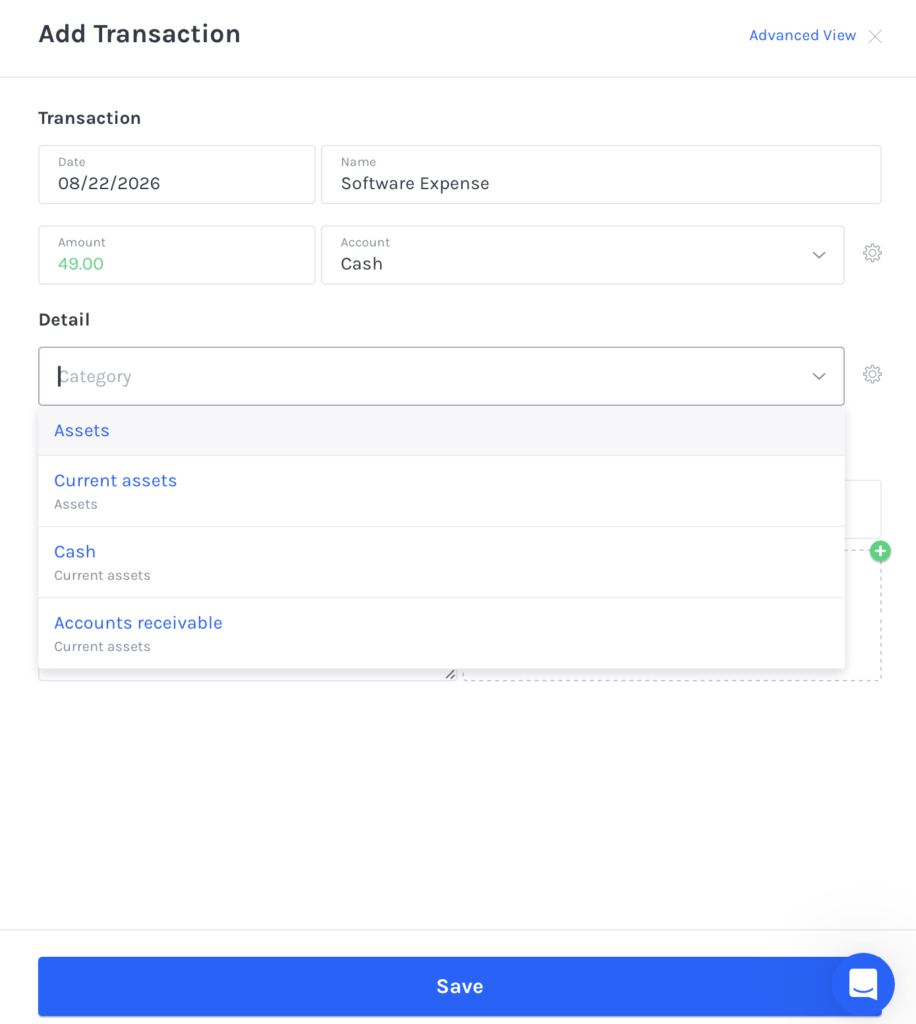
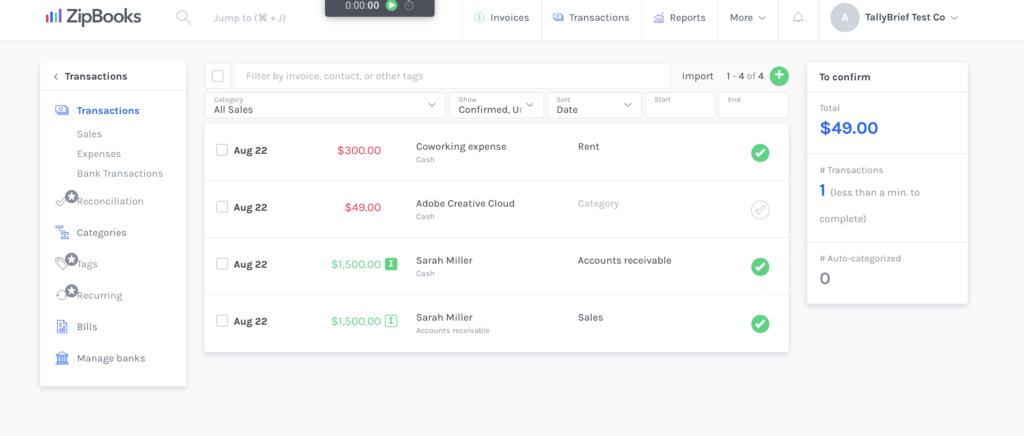
Creating a $49 manual expense in ZipBooks took more figuring out than invoicing. The Standard view keeps things simple by hiding the debit and credit fields, but some parts of the workflow weren’t immediately obvious. We initially had trouble drafting the expense because it was tucked behind a small green + button to start. When categorizing our test expense, the existing Software & Subscription category wasn’t clearly presented in the dropdown, so we had to start typing its name to find it.

Once the expense was recorded, making corrections was easy. We could reopen the transaction, change an incorrect category, and save it without recreating the expense. If you wish to tag your expenses, you would have to get the Sophisticated Plan for it. 

ZipBooks expense entry screen showing a categorized business expense
expense interface after uploading invoice
Advantages
Limitations

Our take: ZipBooks handles basic expenses well once you know the workflow, and correcting an existing transaction is easy. The initial process could have been more intuitive, particularly when finding categories and locating the option to add a new expense. 

Time Tracking

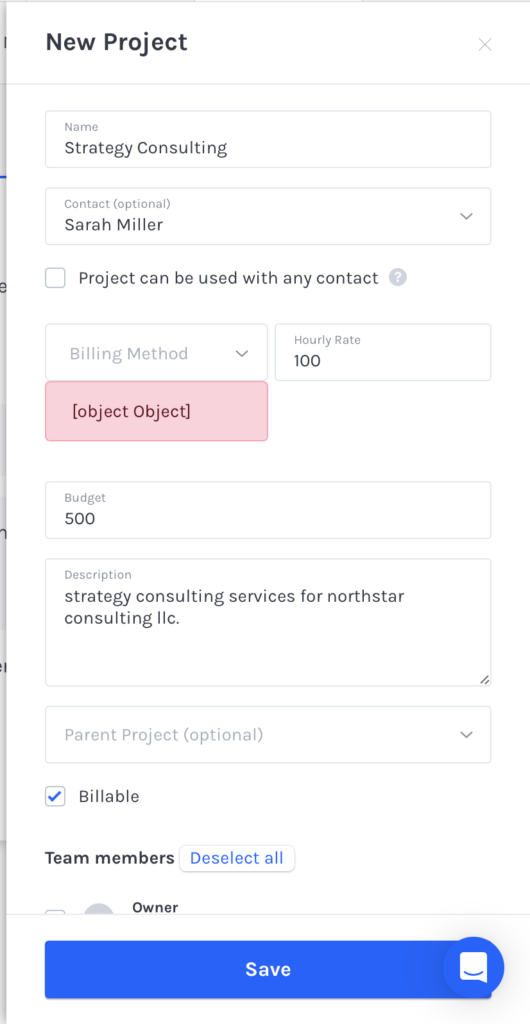
We ran into a problem when testing the ZipBooks Time Tracking workflow. To create a billable project, ZipBooks required us to select a billing method, but the field did not load any selectable options. Refreshing and reopening the project did not work, and the interface displayed the error message “[object object]”. As a result, we couldn’t complete the test and had to contact support for assistance.

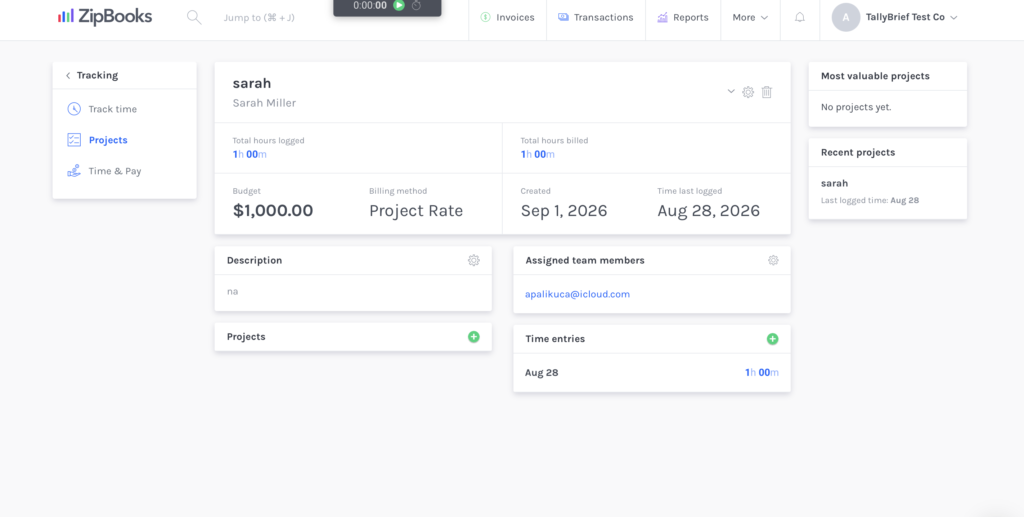
ZipBooks fixed the error after we contacted support. We then created a project for our billing method, set a $1,000 project budget, assigned a team member, and logged one hour of work. ZipBooks subsequently showed the hour as both logged and billed on the project dashboard. After the initial issue was resolved, the time tracking workflow worked as expected. 

ZipBooks error message encountered for time tracking.
successful time tracking sequence
Advantages
Limitations

Our take: ZipBooks’ time tracking worked well once the initial issue was fixed. It covers the core project, time logging and billing workflow a freelancer or solo consultant is likely to need. 

Recurring Invoices

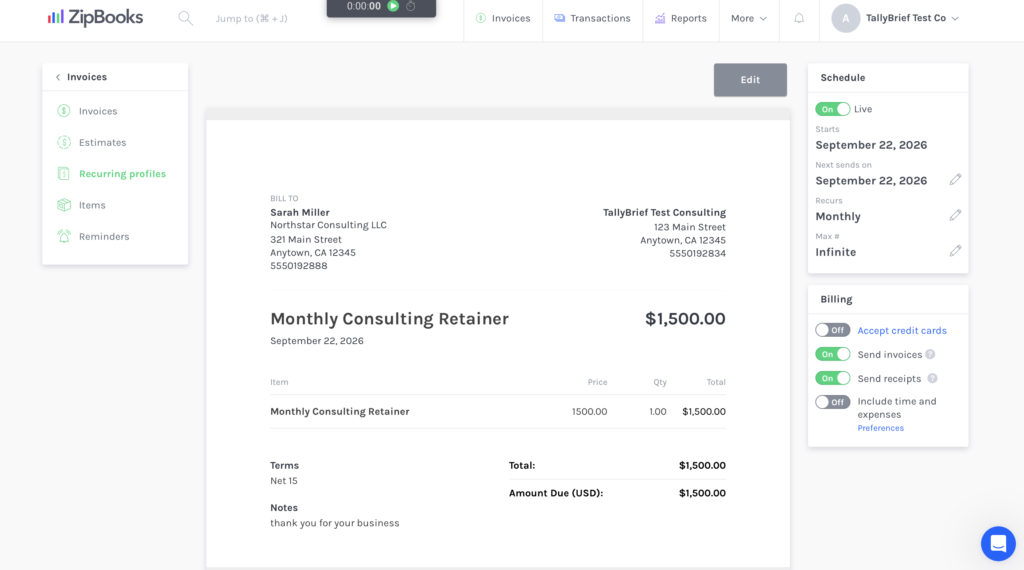
Setting up a recurring invoice was straightforward. We used our $1,500 consulting retainer and set ZipBooks to invoice the client automatically each month. Because the recurring invoice editor works much like the regular invoice editor, there wasn’t much new to learn.

ZipBooks clearly showed when the recurring invoice would start, when the next invoice would be sent, and how often it would repeat. We could also turn automatic sending on or off from the same screen. For freelancers with clients who pay the same amount every month, this could save you from having to create and send the same invoice manually each time.

ZipBooks recurring invoice settings showing monthly billing schedule
Advantages
Limitations

Our take: Recurring invoicing is definitely an added plus to ZipBooks’ workflow. It works great for freelancers who have continuous business with clients or monthly retainers. 

Estimates & Payment Reminders

ZipBooks’ estimates closely resemble its standard invoicing workflow, so creating one already felt familiar. We created a $500 estimate for our test client, marked it as accepted, and then converted it into an invoice. ZipBooks automatically carried over the customer, title, line item, description, quantity, rate, total, terms and notes, so there was little information to re-enter.

We also tested overdue invoice reminders. ZipBooks let us choose how many days after an invoice’s due date the reminder should be sent and customize both the email subject and message. Setup was simple; although newly created reminders weren’t enabled automatically, we had to switch the reminder on separately after saving it. It’s important not to forget that in case you want to set up recurring reminders. 

Advantages
Limitations

Our take: Estimates and reminders are simple but useful additions to Zipbooks’ invoicing workflow, particularly for freelancers and solo consultants who regularly send out quotes or chase overdue payments. 

Integrations and Preferences

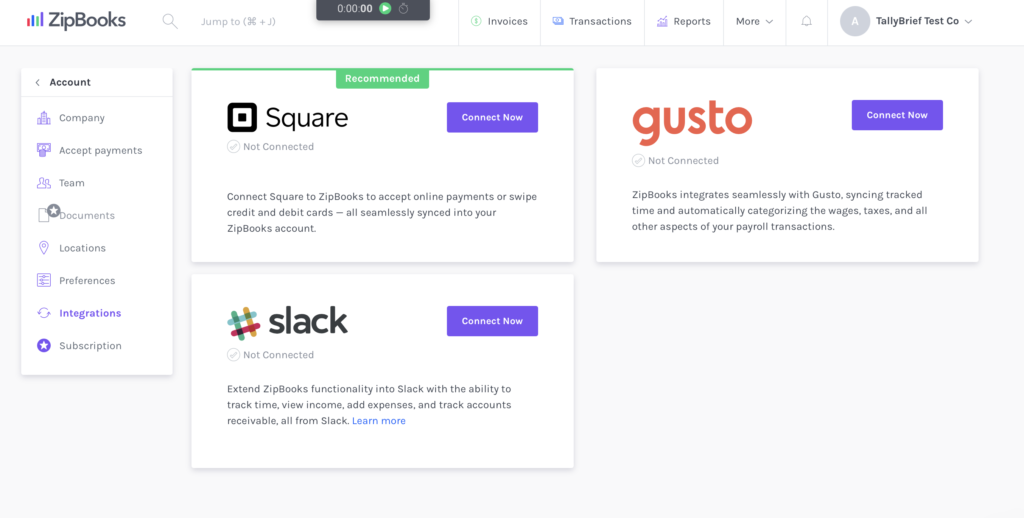
ZipBooks’ native integration was okay. During our testing, the integration page included Square, Gusto, Slack and PayPal. Square and PayPal provide payment options, while Gusto adds payroll functionality and Slack can be used for conveniences such as time-entry and expense notifications. These cover some useful basics, but we were expecting a broader ecosystem of third-party apps.

ZipBooks provided a more extensive range of preferences. We could configure settings such as currency, accounting terminology, reporting basis, transaction confirmations, category display, and time-tracking requirements without making the interface particularly difficult to navigate. More advanced customization is plan-dependent. For example, adding a custom footer to the financial statement required a sophisticated plan.

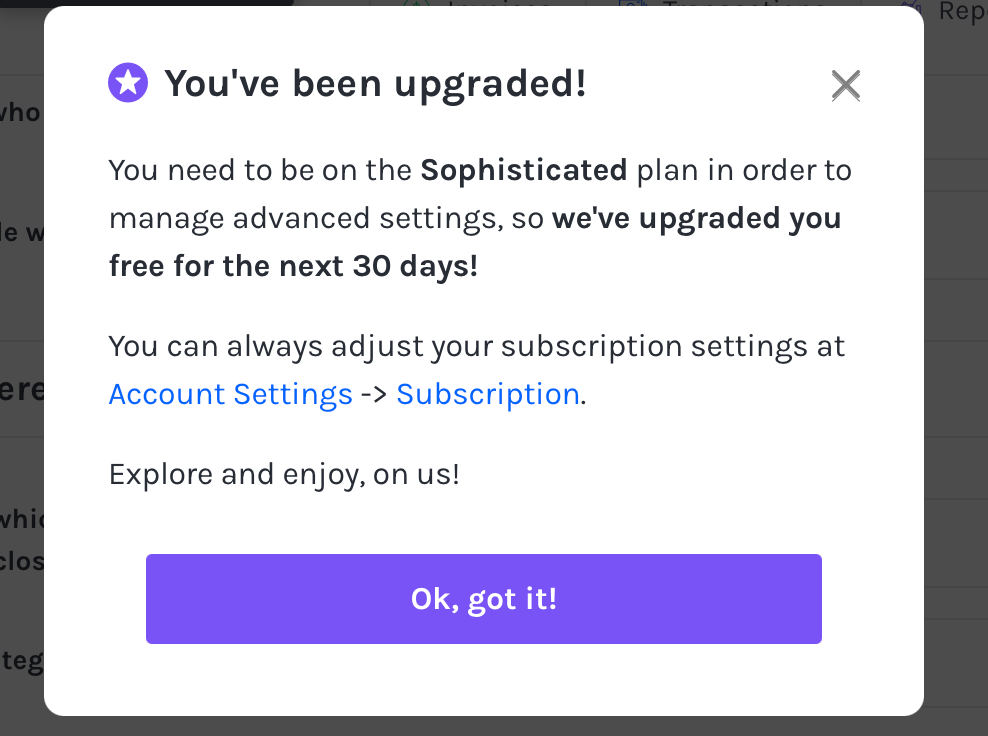
Strangely, we encountered another ZipBooks automatic trial upgrade. Selecting a setting marked as sophisticated upgraded our account to a 30-day trial rather than showing a confirmation or paywall. This was the second time during our testing that attempting to use a higher-tier feature automatically changed our plan. 

ZipBooks integrations page showing square, gusto, slack
ZipBooks automatic 30-day Sophisticated plan trial upgrade
Advantages
Limitations

Our take: ZipBooks offers plenty of control over its accounting settings, but its relatively small native integration library may be restrictive for freelancers who rely on a larger software stack. 

Day-to-Day Experience

Day-to-Day Experience

After spending a couple of weeks with ZipBooks, we found the overall experience to be refreshingly straightforward, though occasionally rough around the edges. The interface is uncluttered and easy to navigate, making most everyday accounting tasks feel surprisingly effortless.

We did encounter some hiccups along the way, but none were serious enough to undermine the overall experience. There were occasional glitches, some controls were harder to find than they should have been, and a few workflows took some figuring out at first. Once we became familiar with how ZipBooks worked, however, most of that friction faded.

One thing we particularly appreciated was how easily ZipBooks let us explore its paid features. When we attempted to use higher-tier functionality, our account was automatically moved onto a 30-day trial without requiring payment information. For freelancers still deciding whether ZipBooks is right for them, this provides a useful opportunity to explore more of the platform before committing to a paid plan.

So, would we recommend ZipBooks to our freelancers and solo consultants? Yes, with some caveats. 

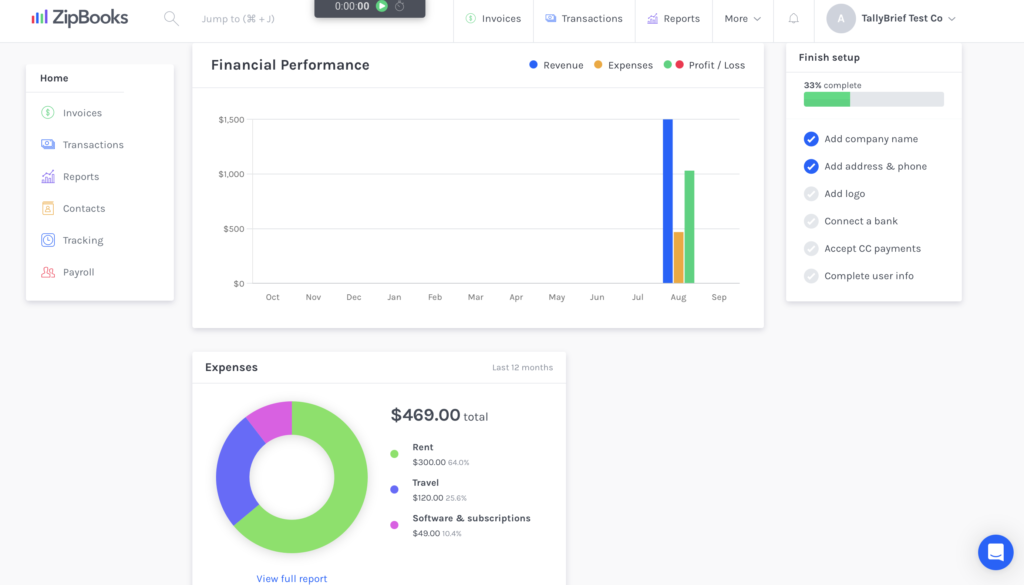
ZipBooks dashboard after hands on testing with sample business data

Our ZipBooks test account after working through its core accounting workflows.

"ZipBooks gets the fundamentals right without making simple accounting feel complicated."
TallyBrief Testing Team
Hands-on product testing
Strengths and Weaknesses

Strengths and Weaknesses

Strengths

Weaknesses

Customer Support

Customer Support

For support, we recommend using ZipBooks’ live chat. Response times varied during our testing. Our first issue, which involved business verification, received a response from ZipBooks and was resolved within five minutes. Our second issue, involving a technical problem with time tracking, took considerably longer, at roughly 36+ hours. However, support ultimately fixed the issue, and we were able to use the feature normally again. Overall, our experience was positive, although we assume response times can vary depending on the complexity of the problem.

Support Channel

What We Found

Live Chat (within app)

Successfully resolved issues using this 

Email Support

Available; not tested

Phone Support

Not available

Help Center / Knowledge Base

Available; not tested

Alternatives

Alternatives to ZipBooks

ZipBooks won’t be the right fit for every freelancer or solo consultant. If you need more advanced accounting tools, a stronger focus on service-based businesses, or simply want to keep costs as low as possible, these three alternatives are worth considering.

qb logo
QuickBooks Online

Best For

Advanced Accounting Needs

Worth considering for freelancers whose finances are becoming more complex and who want a broader accounting ecosystem.

FreshBooks

Best For

Service-based freelancers

Geared heavily toward freelancers and service businesses that prioritize invoicing, client billing, expenses, and time tracking.

Wave

Best For

Keeping costs low

A natural alternative for freelancers who primarily want straightforward invoicing and basic accounting without a large software bill.

Final Verdict

ZipBooks is an easy recommendation for freelancers and solo consultants who want accounting and invoicing without needless complexity or a high starting cost.

Its biggest appeal is simplicity: most everyday tasks are easy to manage, the free plan gives you plenty of room to get started, and paid features can be explored before committing. ZipBooks does have some rough edges, including a limited integration selection and occasional usability issues, but for freelancers with relatively straightforward accounting needs, we think the positives comfortably outweigh the drawbacks.

Ideal Customer

Freelancers and solo consultants 

Main Strength

Simple, approachable accounting and invoicing

Main Limitation

Limited native integrations and occasional usability issues

[Product Name] · [$X/mo]

Scroll to Top