
PRICING GUIDE
QuickBooks Online Pricing (2026): Which Plan Is Right for You?
Our QuickBooks Online pricing guide breaks down all four plans (Simple Start, Essentials, Plus, and Advanced), what each tier includes, what add-ons like payroll and payment processing really cost, and which plan makes the most sense for your business.
By TallyBrief Editorial Team · Last updated October 2026 · 14 min read
Quick Answer
Essentials is the sweet spot for most small businesses; Plus is where QuickBooks adds inventory and project tracking.
QuickBooks Online pricing starts at $38 per month for Simple Start and climbs to $340 per month for Advanced. New customers can take 50% off for the first three months or a 30-day free trial, but not both.
Simple Start is enough for a one-person business that needs bookkeeping, invoicing, and bill pay, but it includes only one user.
Essentials at $85/month is the best value for most small teams: 3 users, multicurrency, enhanced reports, and billable time. Move to Plus ($140/month) when you need inventory, project profitability, or budgets.
Pricing at a Glance
QuickBooks Online Pricing at a Glance
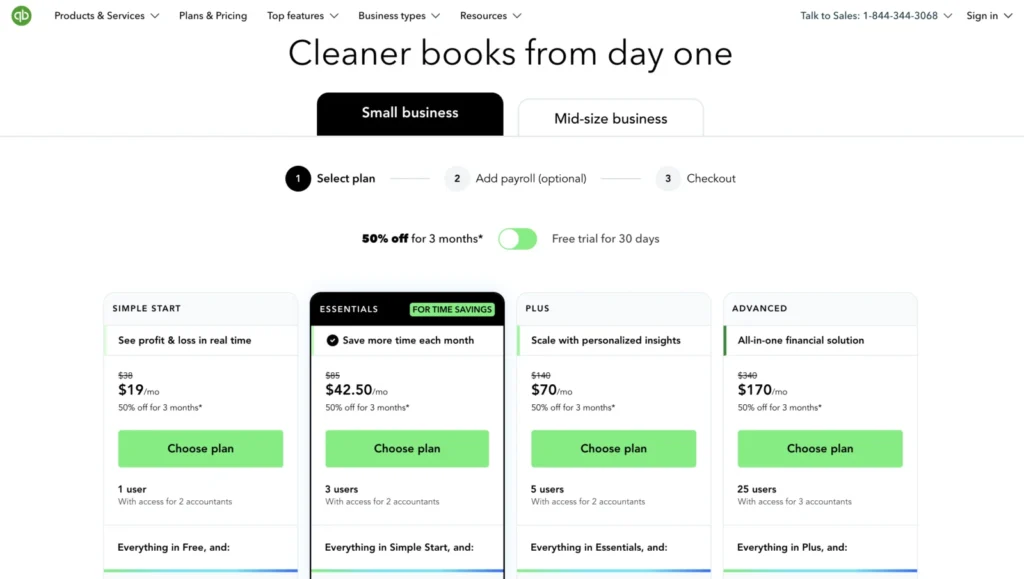
QuickBooks Online pricing covers four plans, from Simple Start at $38 per month to Advanced at $340 per month. Each plan is billed monthly by default; paying annually saves 10%, and new customers can get 50% off for their first three months.
Plan
Monthly price
Annual billing (10% off)
First 3 months (50% off)
Users
Best for
Simple Start
$38/month
$410.40/year
$19/month
1 user + 2 accountants
Solo owners who need core bookkeeping, invoicing, and bill pay
Essentials
$85/month
$918/year
$42.50/month
3 users + 2 accountants
Small service teams that bill for time or work in multiple currencies
Plus
$140/month
$1,512/year
$70/month
5 users + 2 accountants
Product and project-based businesses that need inventory and budgets
Advanced
$340/month
$3,672/year
$170/month
25 users + 3 accountants
Larger teams that need custom permissions, automation, and advanced reporting
Note: Figures are QuickBooks Online US list prices, verified on Intuit’s website in October 2026. The annual price reflects Intuit’s 10% discount for paying annually; we could not confirm whether it can be combined with the three-month introductory offer. The 50% offer is for new customers on monthly billing, and you must choose either it or the 30-day free trial. Prices exclude sales tax and add-ons such as payroll and payment processing.
Who This Guide Is For
Is This Guide Right for You?
This guide is for small-business owners and teams comparing QuickBooks Online plans who want a clear picture of what each tier costs, including the add-ons that raise the real monthly bill. QuickBooks’ Solopreneur plans (Free and Lite) are a separate product line for single-owner businesses and aren’t covered here. If you’re comparing costs, see our Zoho Books pricing guide for a cheaper alternative.
- Small-business owners choosing their first QuickBooks Online plan
- Growing teams deciding between Essentials and Plus
- Existing customers re-evaluating their plan after the August 2026 price increase
- Businesses adding payroll, payments, or bill pay that want the full monthly cost
How Pricing Works
How QuickBooks Online Pricing Works
QuickBooks Online charges a flat monthly subscription per company. Each plan includes a fixed number of users, accountant access is free, and add-ons such as payroll, time tracking, and payment processing are billed separately.
Introductory Offer vs. Free Trial
New customers choose one of two offers: 50% off the monthly base price for the first three months, or a 30-day free trial. You can’t combine them. When the offer ends, you pay the full list price, so Plus, for example, goes from $70 to $140 per month in month four.
Monthly vs. Annual Billing
QuickBooks Online is billed monthly by default, but Intuit gives a 10% discount if you pay annually, chosen at checkout when you subscribe. On Plus, that works out to $1,512 a year instead of $1,680. The annual option isn’t shown on the main pricing page, so it’s easy to miss.
Users and Accountant Seats
Simple Start includes 1 user, Essentials 3, Plus 5, and Advanced 25. Every plan also lets you invite accountants for free (two accounting firms on Simple Start through Plus, three on Advanced), and they don’t count toward your user limit. You can’t buy extra users, so outgrowing your limit means upgrading.
Prices Increased in August 2026
Intuit raised QuickBooks Online prices on August 1, 2026: Essentials went from $75 to $85, Plus from $115 to $140, and Advanced from $275 to $340, while Simple Start stayed at $38. A year earlier, the plans cost $35, $65, $99, and $235. Many review sites still list the older prices, so double-check any figure you see elsewhere.
Good to Know
Prices in this guide were checked against Intuit’s US pricing pages in October 2026. QuickBooks changes its pricing and promotions often, so confirm the final price at checkout. See how TallyBrief tests and researches software.
Plan Comparison
QuickBooks Online Plans Compared
QuickBooks Online’s four plans build on each other: every tier includes everything in the one below it, plus more users and new capabilities. The jumps that matter most are multicurrency and billable time at Essentials, inventory and projects at Plus, and custom permissions, automation, and advanced reporting at Advanced.
Simple Start
$38 per month ($19/month for the first 3 months)
BEST FOR: Sole proprietors and one-person businesses that need core bookkeeping, invoicing, and bill pay.
Simple Start covers the accounting basics: automated bookkeeping and bank feeds, invoicing and online payments, estimates, receipt capture, mileage tracking, automatic sales tax, general business reports, and contractor management. It also includes Intuit Intelligence features such as AI expense categorization, a tax-deduction finder, cash flow planning, and Bill Pay AI.
The main limit is one user. You can invite two accounting firms for free, but if anyone else on your team needs access, you’ll need Essentials. Simple Start also connects only one sales channel and doesn’t support multicurrency.
Move to Essentials when you add a team member, bill clients for time, or work in more than one currency.
Key reasons to choose it
- 1 user + 2 accountant seats
- Automated bookkeeping, bank feeds, and receipt capture
- Invoicing, estimates, recurring invoices, and automatic sales tax
- Bill Pay with free standard ACH payments
- Mileage tracking and contractor management
- 1 connected sales channel
Essentials
$85 per month ($42.50/month for the first 3 months)
BEST FOR: Small service businesses and teams of up to three that bill for time and need better reporting.
Essentials is where QuickBooks Online becomes a team tool. It triples the user count to 3 and adds multicurrency, time entries you can add to invoices, enhanced reports with custom formulas, basic KPIs and dashboards, and three connected sales channels.
It also adds customer tools such as appointment scheduling, website contact forms, and customer referrals and testimonials, plus more AI: Accounting AI to clean up your books, Payments AI, automated bulk invoicing (beta), Business Tax AI for quarterly estimates, and an annual books check-in.
For most small service businesses, Essentials is the best value in the lineup. It doesn’t include inventory, project tracking, or budgeting; those start at Plus.
Key reasons to choose it
- 3 users + 2 accountant seats
- Multicurrency transactions
- Add employee time to invoices
- Enhanced reports, custom formulas, and basic KPIs and dashboards
- 3 connected sales channels
- Appointment scheduling and website contact forms
Plus
$140 per month ($70/month for the first 3 months)
BEST FOR: Product-based and project-based businesses that need inventory, budgets, and profitability tracking.
Plus is the first plan with inventory tracking (including purchase orders, sales orders, item receipts, and shipping labels), project management with profitability tracking, budgeting, and class and location tracking (up to 40). It raises the user limit to 5 and connects all of your sales channels.
Plus also adds AI-powered reconciliation, automated categorization with validation, anomaly detection, Sales Tax AI, and Customer AI with lead management.
At $140/month, Plus costs $55 more than Essentials. That’s worth paying if you carry inventory or need to know which projects make money; if you don’t, Essentials is usually enough.
Key reasons to choose it
- 5 users + 2 accountant seats
- Inventory tracking, purchase orders, sales orders, and shipping labels
- Project management with profitability tracking
- Budgeting
- Class and location tracking (up to 40)
- All sales channels plus lead management
Advanced
$340 per month ($170/month for the first 3 months)
BEST FOR: Growing businesses and mid-size teams that need custom permissions, automation, and advanced reporting.
Advanced raises the user limit to 25 (plus three accounting firms) and adds the controls a bigger team needs: custom user roles and permissions, workflow automation, batch invoices and expenses, data sync with Excel, unlimited classes and locations, and 12 custom fields.
Reporting moves up a level with management reports, a custom report builder, forecasting, revenue recognition, fixed-asset tracking, and unlimited KPIs. Since August 2026, Advanced also includes Bill Pay Elite (approval workflows and unlimited 1099 e-filing, normally $45/month), new construction and enhanced project financials, quarterly books check-ins, and Priority Circle support.
Advanced rose from $275 to $340 per month in August 2026. It’s worth it if you need more than five users or approval controls; otherwise, Plus covers most needs for less than half the price.
Key reasons to choose it
- 25 users + 3 accountant seats
- Custom user permissions and workflow automation
- Bill Pay Elite included (approvals and unlimited 1099 e-filing)
- Management reports, custom report builder, and forecasting
- Revenue recognition and fixed-asset tracking
- Priority Circle support plus backup and restore
What It Costs
What Will QuickBooks Online Actually Cost You?
Scenario 1: The Solo Contractor
Who it suits: A one-person consulting or trades business that invoices clients, pays a few subcontractors, and wants an accountant to review the books at tax time.
Simple Start fits this profile. It covers bookkeeping, invoicing, estimates, bill pay with free ACH, mileage, and contractor management, and the owner’s accountant gets free access without using the single user seat.
Actual cost: $19/month for the first three months, then $38/month, or $399 in year one on monthly billing. Every year after that costs $456 monthly or $410.40 billed annually. If you file 1099s, either e-file through QuickBooks (from $14.99 for three forms) or add Bill Pay Premium at $15/month for unlimited 1099 e-filing.
Bottom line: For a solo business, Simple Start is all you need until you hire someone who needs access to the books.
Scenario 2: The Growing Service Team
Compare: Essentials vs. Plus
Who it suits: A three-person agency or consultancy that bills clients for time, works with a few international clients, and is starting to think about project margins.
Essentials — $892.50 in year one
Choose it if the team mainly needs three users, billable time on invoices, multicurrency, and better reports. Year one is $127.50 for the discounted first three months plus $765 for the next nine; after that, it’s $1,020 a year monthly or $918 billed annually.
Plus — $1,470 in year one
The extra $660 a year at full price is worth it once you want project profitability tracking, budgets, or class and location tracking, or once a fourth or fifth person needs access. After year one, Plus costs $1,680 a year monthly or $1,512 billed annually.
The pricing decision: Essentials covers a service team’s day-to-day accounting; Plus pays for itself only when you actively manage projects, budgets, or inventory.
Scenario 3: The Product Business With Employees
Compare: Plus vs. Advanced, with payroll
Who it suits: A product business with 10 employees on payroll, inventory to track, and a handful of managers who need access to the books.
Plus + Workforce Premium — about $358/month
Plus ($140) plus QuickBooks Workforce Premium ($88 + $13 per employee, or $218 for 10 employees) comes to about $358 a month, or roughly $4,296 a year at full price. Workforce Premium includes same-day direct deposit, HR tools, and time tracking. Payroll employees don’t need QuickBooks user seats, so Plus’s five users go further than they sound.
Advanced + Workforce Premium — about $558/month
Switching to Advanced adds $200 a month ($2,400 a year). That buys up to 25 users, custom permissions, approval workflows through Bill Pay Elite, workflow automation, and management reporting.
The pricing decision: Stay on Plus unless more than five people need access to the books or you need approval controls; headcount on payroll alone isn’t a reason to upgrade.
Common Mistakes
Mistakes to Avoid
Even after you understand the plans and how QuickBooks Online pricing works, a few common mistakes can leave you paying more than you expected.
Budgeting Around the Introductory Price
The 50% discount lasts only three months. In month four, your bill doubles: Plus, for example, jumps from $70 to $140 per month.
Better Approach
Compare plans at their full list price and treat the introductory discount as a bonus.
Forgetting the Cost of Add-Ons
Payroll ($50 to $134 per month plus $7 to $17 per employee), payment processing (2.99% on invoiced card payments, 1% on ACH), and time tracking are all billed on top of your plan.
Better Approach
Add up your plan, payroll, and expected payment fees before choosing a tier.
Upgrading to Advanced Just for More Users
Advanced costs $200 a month more than Plus. Accountant seats are free and payroll employees don’t need user seats, so many businesses need fewer seats than they think.
Better Approach
Upgrade to Advanced for permissions, automation, or reporting, not headcount alone.
Relying on Outdated Price Lists
QuickBooks raised Essentials, Plus, and Advanced prices on August 1, 2026, yet many comparison sites still quote the old $75, $115, and $275 prices.
Better Approach
Check Intuit’s pricing page or a recently verified guide before you set your budget.
TallyBrief Recommendation
Start with Essentials if you have a team, and move to Plus only when you need inventory or project tracking.
For most small businesses, Essentials is the most sensible QuickBooks Online plan. At $85 per month, it adds the extra users, multicurrency, and billable time that Simple Start lacks, without charging for inventory and project tools you may never use.
Solo owners should start with Simple Start. At $38 per month, it covers core bookkeeping, invoicing, and bill pay, and your accountant can still access your books for free.
Plus is worth the extra $55 a month for product businesses and project-based firms that need inventory, budgets, or profitability tracking. Advanced makes sense once more than five people need access, or when you need approval controls, workflow automation, and management reporting.
If you’re unsure, start a 30-day free trial on the plan you think you need. You can move between Simple Start, Essentials, and Plus as your business changes.
FAQ
Frequently Asked Questions
QuickBooks Online pricing ranges from $38 to $340 per month: Simple Start ($38), Essentials ($85), Plus ($140), and Advanced ($340). New customers can get 50% off for the first three months or a 30-day free trial, and paying annually saves 10%.
Yes. Intuit offers a 10% discount when you choose annual billing at checkout, which brings Plus, for example, to $1,512 a year. For payroll, the annual discount applies only to the base fee; per-employee fees stay monthly.
No. New customers choose either the 30-day free trial or 50% off the monthly base price for three months. After either offer ends, you pay the regular monthly price.
No. Payroll is an add-on called QuickBooks Workforce: Workforce Payroll costs $50/month + $7 per employee, Premium $88/month + $13 per employee, and Elite $134/month + $17 per employee. The introductory 50% discount applies only to the base fee.
There’s no monthly fee. QuickBooks Payments charges 2.99% for invoiced card and digital wallet payments, 1% for ACH bank payments, 2.5% for in-person card payments, and 3.5% for keyed-in cards. Instant deposits cost 1.75%. If you use another processor, such as Stripe or Square, you pay their rates instead.
No. Accountant seats are separate from your plan’s users: you can invite two accounting firms on Simple Start, Essentials, and Plus, and three on Advanced, at no extra cost.
Intuit raised prices for Essentials, Plus, and Advanced on August 1, 2026, while Simple Start stayed at $38. Essentials went from $75 to $85, Plus from $115 to $140, and Advanced from $275 to $340. Advanced now includes Bill Pay Elite, which used to cost extra.
Not among the four main plans. Intuit sells a Free plan and a $20/month Lite plan under its separate QuickBooks Solopreneur line, built for single-owner businesses with no accountant access. Intuit’s pricing page sometimes shows the Free plan alongside the paid plans, but it’s a separate product. The QuickBooks Online plans covered in this guide start at $38 per month.
Ready to Choose Your QuickBooks Online Plan?
When it comes to QuickBooks Online pricing, choose the lowest plan that covers your users and must-have features, budget at the full list price rather than the introductory rate, and add payroll and payment fees before you commit.
TallyBrief may earn a commission if you purchase through links on this page. This does not affect our editorial recommendations.