Software Review
QuickBooks Solopreneur Review (2026): Is It Worth It for Freelancers?
QuickBooks Solopreneur is Intuit’s accounting software for one-person businesses. After two weeks of hands-on testing, we found it does a genuinely good job of keeping a freelancer’s books tax-ready for $20 a month, and its mobile app is a pleasure to use. The website is another story: busy, full of upgrade prompts and clearly built for bigger businesses, and support was hard to reach when we needed it.
By TallyBrief Team · Last tested October 2026 · 22 min read
QuickBooks
QuickBooks Solopreneur
Accounting & Bookkeeping · Smart tools. Better business.
Quick Verdict
If you want tax-ready books for $20 a month and you're happy to work mostly from your phone, QuickBooks Solopreneur Lite is a strong pick. If you'll live in the website, expect clutter and constant upgrade prompts.
Best For
Freelancers who want tax-ready books on a budget
Starting Price
$0/month (Free); Lite $20/month ($10/month for the first 3 months)
Main Strength
Tax-ready books and a genuinely good mobile app
Main Limitation
A cluttered website built for bigger businesses
Free Trial / Free Plan
Free plan (no card needed); no free trial when upgrading
Who It's For
Who QuickBooks Solopreneur Is For
Choose QuickBooks Solopreneur if tax time worries you more than invoicing does. It suits US freelancers and one-person businesses who want their books ready for tax season without hiring a bookkeeper. Just know what you’re getting: QuickBooks Online, designed for small businesses with employees, stock and payroll, with freelancer tools added on top. That’s a plus if you’ll work mostly in the app or expect to grow. If you want software that feels made for one person, ZipBooks felt noticeably simpler in our testing.
Best Suited For
- Freelancers who invoice every month, including clients billed on a schedule
- Self-employed people who want their books organized for Schedule C taxes
- Anyone who wants receipts and bank transactions sorted mostly automatically
- Solo businesses that may grow into a bigger QuickBooks plan later
Not Ideal For
- Anyone who needs an accountant or bookkeeper to log in (Lite is one user)
- Businesses that need payroll, inventory or detailed reports
- Freelancers who want the simplest possible invoicing app
- Freelancers outside the US, since tax tools and payments are US-focused
Methodology
What We Tested
Plan Tested
QuickBooks Solopreneur Lite (upgraded from Free)
Testing Period
2 weeks, October 10–26, 2026
Platform / Device Used
Web app in Safari; iPhone app
Tasks We Completed
- Signed up on the Free plan and upgraded to Lite
- Created customers, services and a $550 test invoice
- Checked the client email, payment page, recurring invoices and progress invoicing
- Imported and categorized 20 bank transactions and created a bank rule
- Uploaded a receipt and checked what QuickBooks read from it
- Reviewed the tax summary and quarterly tax estimates
- Ran Profit and Loss and Balance Sheet reports
- Explored settings, integrations and upgrade prompts
- Contacted customer support through live chat
- Created and sent an invoice, snapped a receipt and tracked mileage in the iPhone app
What We Didn't Test
- A live bank connection (we imported a bank statement instead)
- Real customer payments through QuickBooks Payments
- Filing taxes through TurboTax
- Phone support
This review follows our standard evaluation process. Read our full testing methodology →
Pricing
QuickBooks Solopreneur Pricing
Lite is the plan to buy. At $20 a month ($10 for the first three months), it lifts the Free plan’s tight limits, including just 2 invoices a month, and adds the mobile app, the best part of the product. That’s $5 a month more than ZipBooks’ Smarter plan. Simple Start ($38) only makes sense if you need your accountant to log in or want fuller reports.
Free
Lite (Recommended)
Simple Start
Starting Price
$0/month
$20/month ($10/month for first 3 months)
$38/month ($19/month for first 3 months)
Billing Options
Free, no card needed
Monthly or annual ($216/year)
Monthly or annual ($410.40/year)
Users Included
1
1
1 + accountant access
Main Limits
2 invoices (unlimited with QuickBooks Payments), 2 receipts and 5 mileage trips a month; 1 bank connection; no mobile app
Top 3 reports only; 3 contractors; 2 bank connections; no accountant access
1 user; 1 sales channel; payroll costs extra
Best Suited For
Trying it out
Freelancers who invoice every month
Freelancers who need an accountant login or fuller reports
← Scroll to compare plans →
Extra costs. Online payments cost 2.99% for cards (including Apple Pay, PayPal and Venmo), 1% for bank transfers, 2.5% for in-person cards and 3.5% for typed-in cards. Instant deposit adds 1.75% on top. You can also make clients pay a flat $25 convenience fee for bank transfers on invoices between $125 and $100,000; in our account this was switched on from the start. Tax filing through TurboTax’s Expert Assisted service is also extra; Lite customers get 20% off federal filing for 2025 returns filed by November 30, 2026.
This caught us out. We started on the Free plan, which needed no credit card, and expected a free trial when we upgraded. There wasn’t one: our card was charged $10 straight away. Intuit’s fine print says the 30-day trial and the 50% discount can’t be combined, and the Solopreneur plan page only offers the discount. At checkout, the plan was even called “QuickBooks Lite”, not “Solopreneur”.
Monthly or annual? Annual billing costs $188 for the first year of Lite (vs $210 paying monthly) and $216 a year after that (vs $240). Monthly plans can be cancelled any time.
Worth knowing. Upgrading from Lite to Simple Start inside the app is offered at the full $38/month, with no intro discount. Intuit also says Free and Lite “may be offered for a limited time”, so don’t treat today’s prices as permanent. Prices checked October 2026.
For a full breakdown of the plans and extra costs, see our QuickBooks Solopreneur pricing guide.
Ease of Setup
Ease of Setup
Getting started is quick; getting comfortable takes longer. The Free plan needs no credit card, upgrading happens inside the app, and our first invoice went out within about 10 minutes (ZipBooks took about five). What surprised us was where we landed. QuickBooks Solopreneur Lite isn’t a separate, simple app for freelancers. It’s QuickBooks Online, Intuit’s main small-business software, with bigger-business features like payroll, inventory, budgets and custom reports locked behind upgrade prompts. Intuit’s own FAQ says Solopreneur is built “specifically for single-owner, self-employed businesses”, yet our account’s settings were titled “QuickBooks Online Lite” and the home screen showed Payroll, Inventory and Team.
The upside is a real accounting foundation an accountant will recognize, and one you won’t outgrow. The downside is everything you have to look past to get to it.
When you log in on the website, the home screen lines up 12 shortcut buttons, including Payroll, Inventory, Time tracking and Team, on a one-person plan. Once you know where to look, getting around is easy: quick buttons cover everyday jobs like creating an invoice or recording an expense, and the search bar finds almost anything.
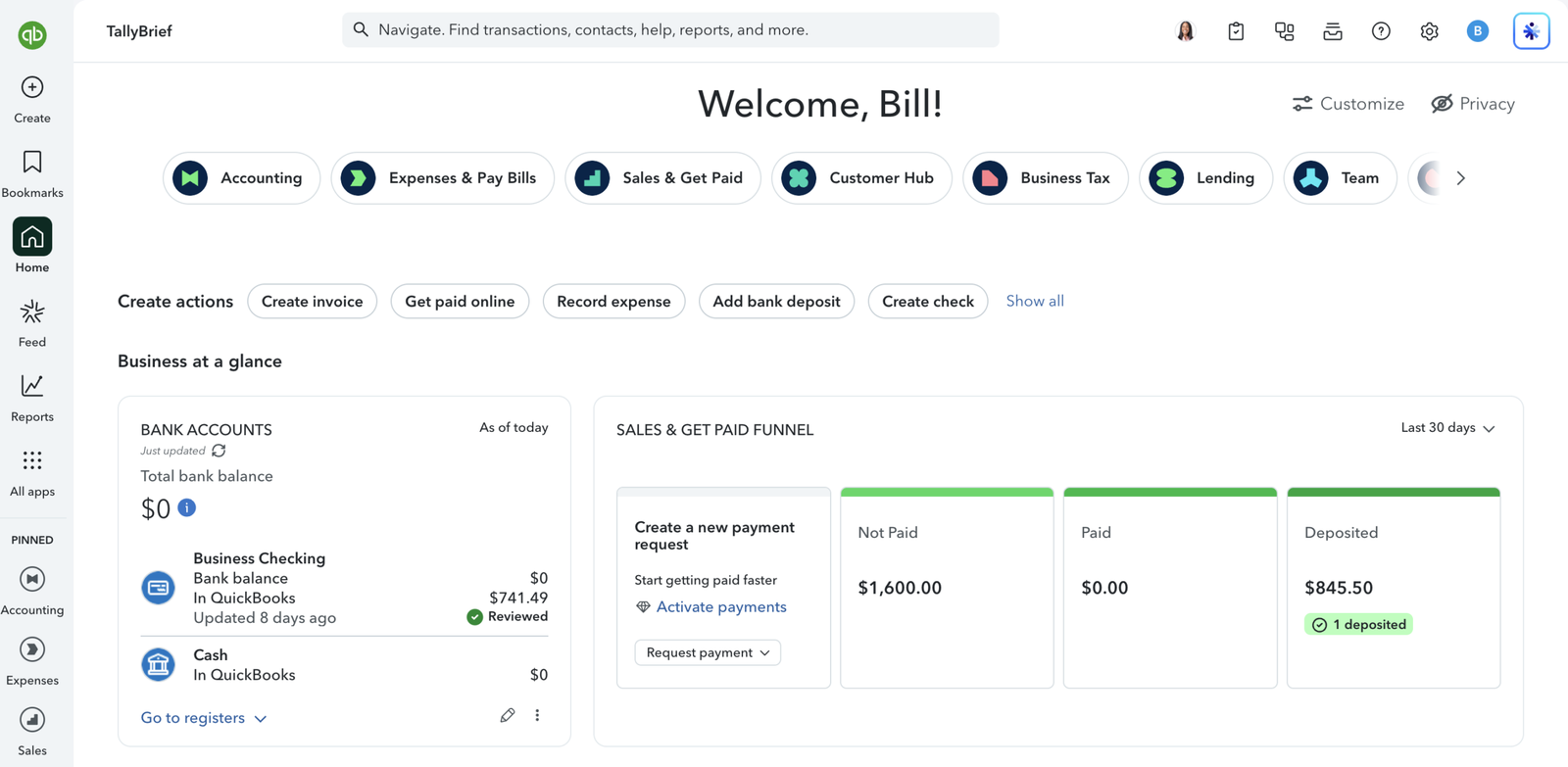
The QuickBooks Solopreneur Lite home screen you see when you log in on the website.
The upselling wore on us. Several of those shortcuts are locked, and clicking Payroll opens a $38/month upgrade with your card already filled in, so paying more is one click away. The Lending section advertises loans and a credit card, and the page showing your plan’s limits suggests QuickBooks Online Advanced, Intuit’s most expensive plan, built for teams of up to 25 people.
Settings are just as big: 11 sections, with more than 30 options for invoicing and sales alone. You can leave most defaults alone (though shipping fields are switched on even for service businesses), but expect it to take a while to learn which parts of the screen you can ignore.
Our advice: do your day-to-day work in the mobile app. The website shows you everything QuickBooks can do, including all the bigger-business features. The app shows only what a freelancer needs: invoices, receipts, mileage and your bank balance. In our testing, it was far easier to live with.
Getting Started Steps
- Sign up for the Free plan with your email (no credit card needed).
- Upgrade to Lite from inside the app (charged immediately; no free trial).
- Add your first customer.
- Set up the services you sell, with default rates.
- Create and send your first invoice.
Time to First Invoice / Entry
Within 10 minutes
Core Features
Core Features
We tested each feature on the Lite plan using realistic freelancer tasks: invoicing a client, importing a month of bank transactions, capturing a receipt, preparing for taxes and running reports. Here’s how each area held up.
Invoicing
Invoicing does more than most freelancers will need, but it was also where QuickBooks let us down most. Billing a client is simple once you’re set up: we sent a $550 invoice for three services on Net 15 terms, and each service only has to be created once, after which adding it to an invoice takes a couple of clicks. Getting there takes more patience than in ZipBooks, where you type straight onto the invoice. QuickBooks’ customer form and invoice screen show far more options than a freelancer needs, from opening balances to shipping fields that are switched on by default. None of it is required, though: it’s more complex in how it looks than in how it works.
Your clients get a polished experience. The email carries your logo and a “View and pay” button, and the payment page lets them pay by card or bank transfer, pay part of the amount, or download the invoice. You can see when they’ve opened it, too: the invoice is marked “Viewed”. To actually receive online payments, you’ll need to link a bank account and confirm some business details first.
For repeat clients, Lite is better value than it looks. Intuit’s plan page suggests recurring billing needs the pricier Simple Start plan, but recurring invoices, recurring card payments and scheduled sending all opened in our Lite account with no upgrade prompt (we didn’t save a live schedule). In ZipBooks, recurring invoices need the $15 Smarter plan. Automatic payment reminders are on from the start, and progress invoicing for staged projects switched on in seconds.
Then it broke, twice. During our two weeks of testing, the website’s new-invoice screen stopped loading on two separate occasions, leaving us unable to create invoices there. Existing invoices still opened, the mobile app kept working, and support didn’t help (see Customer Support). For software you rely on to get paid, that’s a real concern.
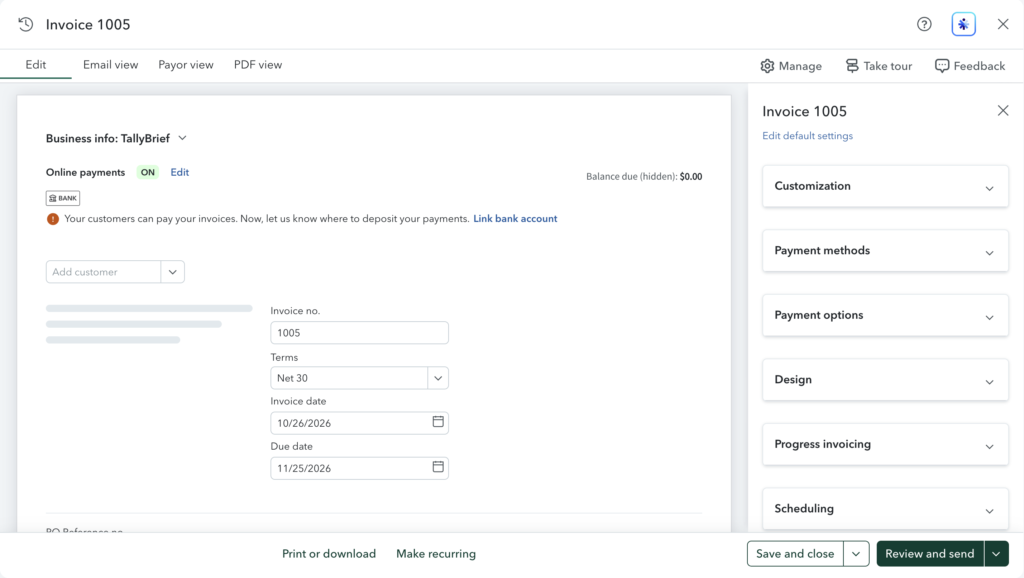
The website’s invoice editor when it worked, with payment, design, progress invoicing and scheduling options in the sidebar.

The same screen when it broke during our testing: new invoices never got past this loading placeholder.
Advantages
- Recurring invoices, recurring payments and scheduled sending on Lite
- Automatic payment reminders, on by default
- Polished client email and payment page, with partial payments
- Progress invoicing and deposits for bigger jobs
Limitations
- Busy customer and invoice screens for a solo freelancer
- Shipping fields on by default for service businesses
- No default prices unless you set them
- Online payments need a linked bank account first
- New-invoice screen on the website stopped loading twice during testing
Our take: Strong features for a $20 plan, especially recurring billing and reminders, but the website’s invoice screen failing twice in two weeks means you should test it yourself before relying on it.
Bookkeeping
Bookkeeping is mostly automatic, but you still need to check the work, especially income. To test it, we imported a sample bank statement of 20 typical freelancer transactions. Importing is easy: QuickBooks takes CSV and bank files, even PDFs or photos of statements, and its wizard worked out our file’s layout by itself. The one stumble is that you first have to create the bank account in bookkeeping terms, choosing an “account type” (Bank) and a “detail type” (Checking). If you’d rather connect your bank directly, Lite allows 2 connections (ZipBooks’ free plan allows one).
QuickBooks then tidied up the list, turning 15 of the 20 messy bank descriptions into readable names (“ADOBE *CREATIVE CLOUD 408-536…” became “Adobe Creative Cloud”). At first, though, it suggested a category for only 2 of them.
Rules save you from fixing the same mistake twice. We sorted the first Adobe charge ourselves, then set up a rule, an instruction like “anything from Adobe goes under Office expenses”. A Test rule button showed which transactions it would catch, and it then sorted the second Adobe charge and added it to our books automatically. One thing to watch: that automatic step (QuickBooks calls it “auto-post”) is switched on by default, so anything a rule catches skips your review unless you turn it off.
Its guesses were mostly right, but the misses were the ones that matter. A few minutes later, QuickBooks had suggested categories for all 18 remaining transactions, and 14 were right, including Netflix correctly flagged as personal. The 4 misses were more serious: an $845.50 Stripe payout landed in “Uncategorized Asset” instead of income, and groceries, Google Workspace and an Upwork fee all ended up in the wrong place. Left alone, a misfiled payout like that would quietly understate your income at tax time. We fixed all 4 by hand in a few clicks each, approved the 18 in one go, and the balance matched our bank statement to the cent.
The category list feels built for bigger businesses: employee benefits and workers’ compensation sit near the top, and there’s no “Software” category for subscriptions like Adobe or Zoom, which ZipBooks does have. The Home office category, with sub-categories for rent, utilities and mortgage interest, is a welcome exception.
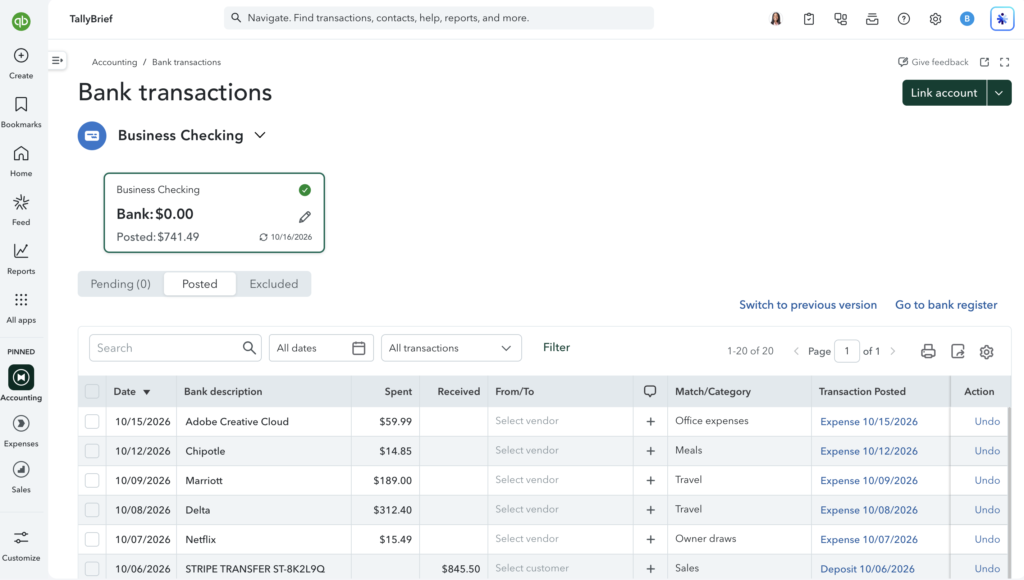
Our 20 test bank transactions, each posted with its category.
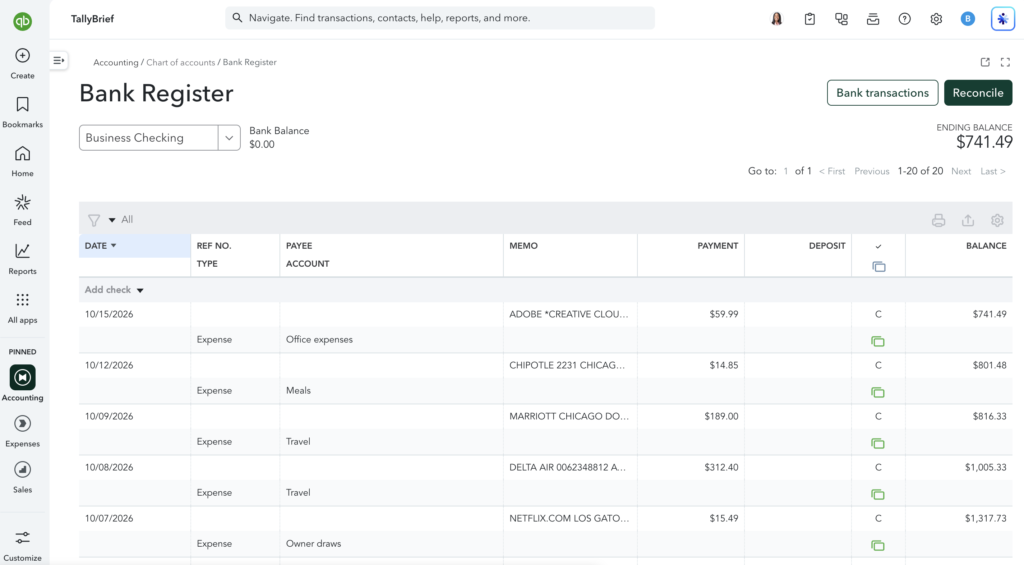
The bank register shows the same transactions as a running ledger.
Advantages
- Imports CSV, bank files, PDFs and photos of statements
- Turns messy bank descriptions into readable vendor names
- Mostly accurate category suggestions, including personal spending
- Rules with a test preview, plus one-click bulk posting
Limitations
- Suggestions take a few minutes to appear
- Income can be misfiled (a Stripe payout landed in an asset account)
- Category list built for companies with staff
- Accounting jargon when adding a bank account
- Lite allows only 2 bank connections
Our take: Solid, mostly automatic bookkeeping that saves real time, but check every transaction before approving it, especially income.
Expenses
Receipt capture is one of the most polished parts of Lite. You can upload receipts (PDF, PNG, JPEG or HEIC) or email them to your own QuickBooks address. Our test receipt from Office Depot was read in about 30 seconds, with the shop, date, total and category all correct. The only gap: it couldn’t match the receipt to a card payment, because we hadn’t linked a card.
Recording an expense by hand is easy to find, too: the Record expense button sits on the home screen, with none of the hunting we did in ZipBooks. The form can fill itself in from a file or phone photo, and regular costs like subscriptions can be set to repeat. We also snapped paper receipts with the iPhone app; for how that went, see Mobile App below.
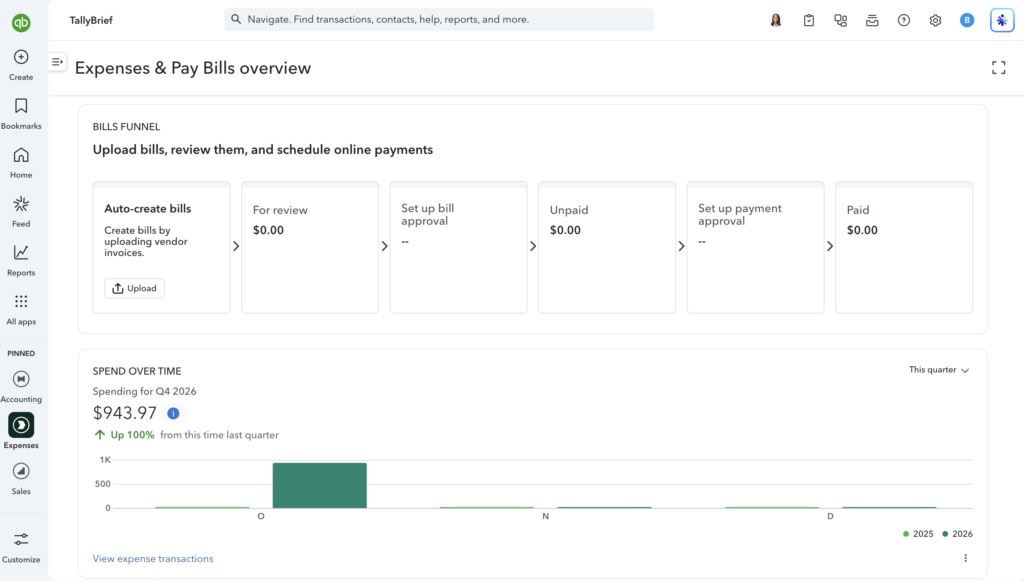
The Expenses and Pay Bills overview, with a bills funnel and a quarterly spending chart.
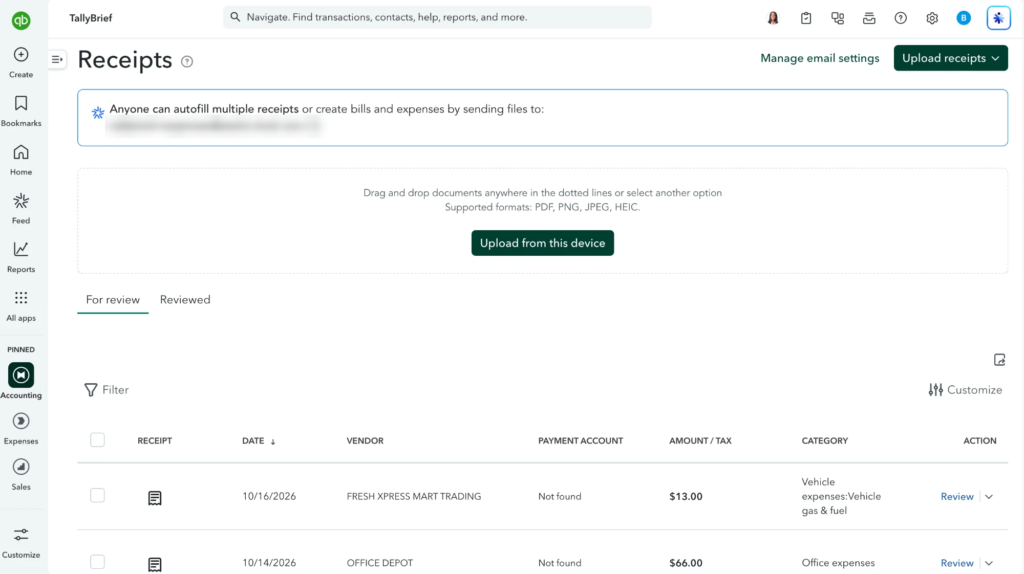
Receipts waiting for review, with the vendor, amount and category QuickBooks read from each. Forwarding address blurred.
Advantages
- Accurate receipt reading (vendor, date, total, category)
- Email receipts straight into QuickBooks
- Expense form fills itself from a photo or file
- Recurring expenses for regular costs
Limitations
- Receipts only match a payment card if one is connected
- Mileage tracking only works in the mobile app
Our take: Fast, accurate receipt capture that takes much of the pain out of expense tracking, on the web and especially on your phone.
Taxes
Taxes are where QuickBooks Solopreneur earns its keep. This is where its Self-Employed roots show: the Business Tax hub gives you a 2026 checklist, your federal deadlines and a running estimate of what you could be taxed on, all updating as you go.
The Tax summary does the tax thinking for you. It sorts your spending into Schedule C categories and applies rules a freelancer might not know, such as cutting meals to 50%. When we approved the two drives the mobile app had tracked, a $13 mileage deduction appeared on its own and our taxable profit dropped to $891. One click on Download tax summary produced a tidy five-page PDF, laid out by Schedule C category, that we’d happily hand to an accountant.
The two helpers genuinely surprised us. The Deduction maximizer looks at your industry (ours was set to marketing consulting) and lists deductions businesses like yours often miss, from money-transfer fees to parking for client visits, with buttons to add them or set a reminder. It even spotted our Uber ride as “likely in your books”, and there was no upsell attached. The home office calculator explains who qualifies and offers both methods: a simple $5 per square foot, or a share of your actual home costs.
The quarterly tax estimate is the weak spot. It shows what to pay and when, and tracks any underpayment, but it only projects from your books so far. You can’t enter your own income forecast, and a fuller version that counts other income, deductions and credits needs the pricier Essentials plan. That’s fine for steady earners, and much less useful if your income is lumpy or you’ve just started.
Lite also includes TurboTax’s Expert Assisted service with 20% off federal filing for 2025 returns filed by November 30, 2026, paid only when you file. We couldn’t test filing: the Year-end filing page said it isn’t available for our account, likely because we tested from outside the US.
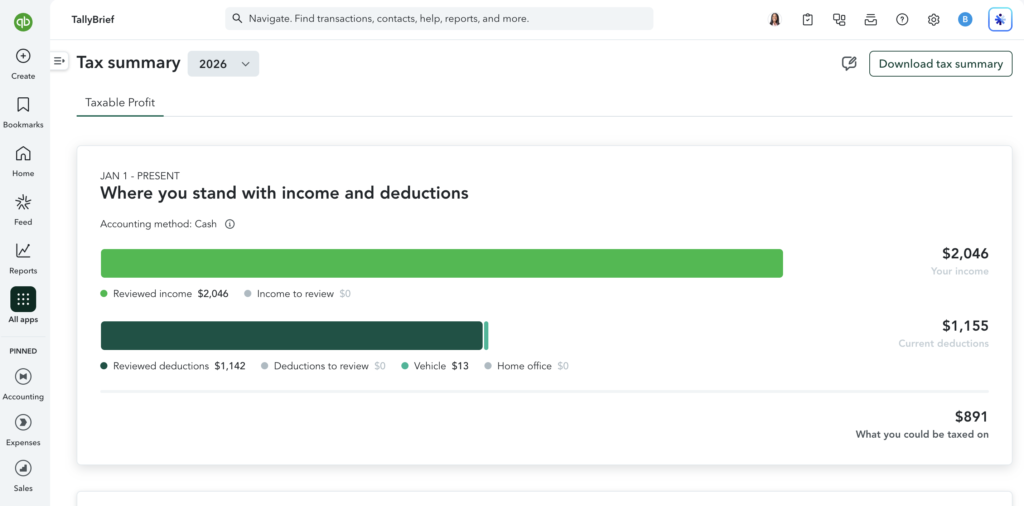
Our approved mileage appeared here as a $13 vehicle deduction on its own.
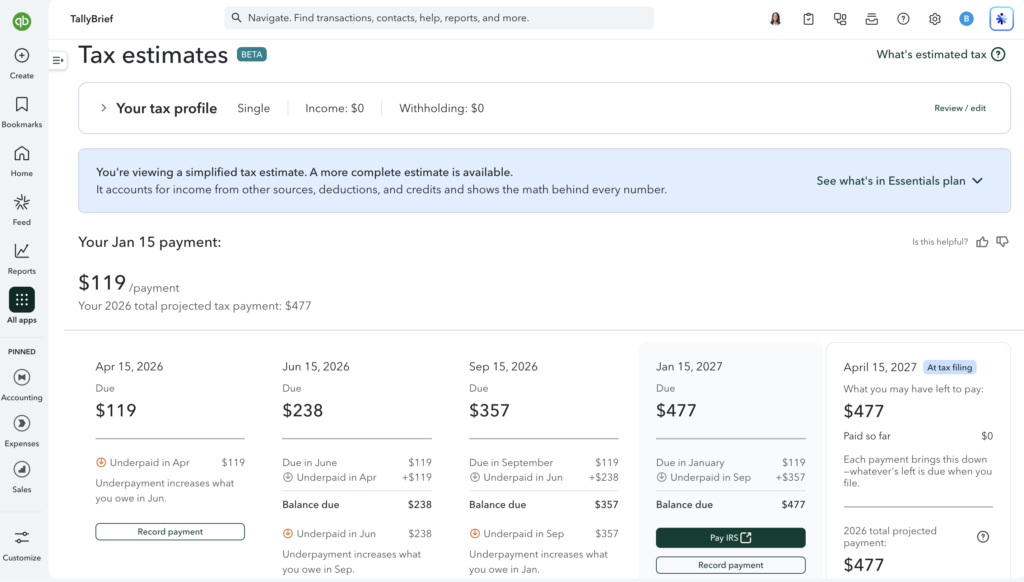
The quarterly estimate only projects from your books. A fuller version needs the Essentials plan.
Advantages
- Schedule C-style tax summary with automatic rules (50% meals)
- Tracked mileage flows into your deductions automatically
- Deduction maximizer suggests commonly missed deductions for your industry
- One-click PDF tax summary for your accountant
- Federal deadlines and quarterly estimates with underpayment tracking
- 20% off federal filing with TurboTax Expert Assisted (until Nov 30, 2026)
Limitations
- You can't enter your own income forecast
- Fuller estimates need a pricier plan
- Federal only; state deadlines are added by hand
- Filing not tested (unavailable from outside the US)
Our take: Tax prep is Lite’s biggest strength and the best reason to choose it. Just treat the quarterly estimate as a rough guide, not a number to pay blindly.
Reporting
If you just want to know whether you made money, Lite’s reports do the job. If you want to know why, you’ll hit a paywall. There are only three reports (Profit and Loss, Balance Sheet and Account List), and custom reports and budgets both open an upgrade window for the $38 Simple Start plan. ZipBooks’ free plan is similarly limited: its cash flow statement and summary reports also needed an upgrade.
What’s there is accurate. Our Profit and Loss matched our test books to the cent and switches between cash and accrual in one click, handy for counting unpaid invoices as income. You can split figures by month or by client, compare periods and export to Excel, PDF or CSV. The Balance Sheet balanced exactly, with personal spending correctly shown as owner draws.
For most freelancers, a P&L, a Balance Sheet and the Tax summary cover the essentials. As your business grows, you’ll miss cash flow, unpaid-invoice and spending-by-vendor reports.
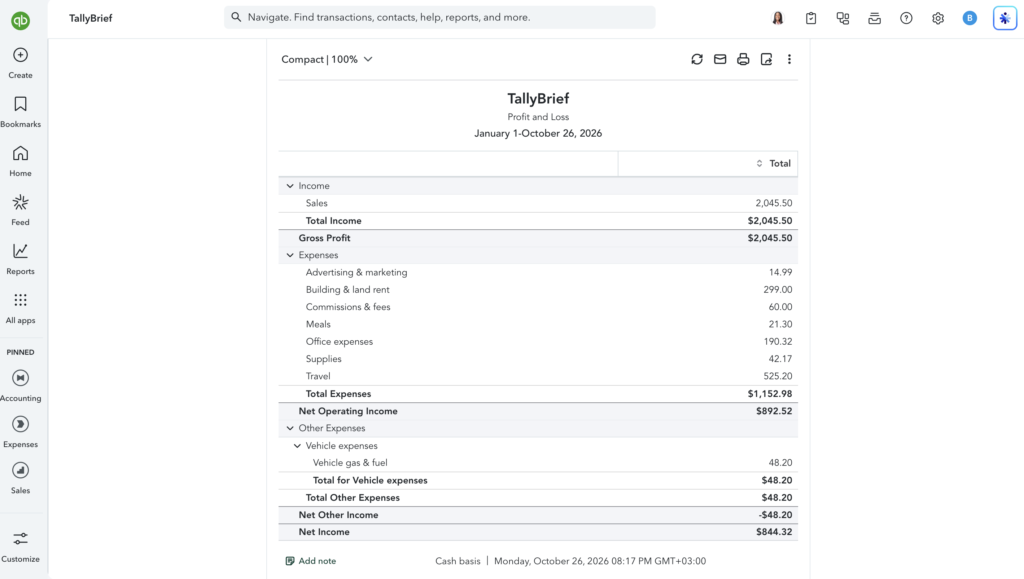
The Profit and Loss matched our test books to the cent.
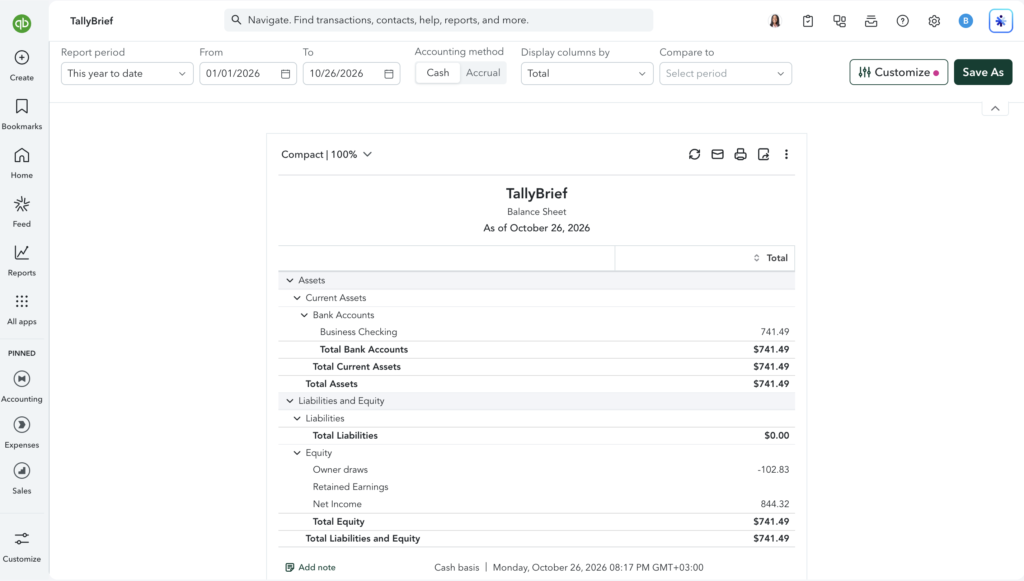
The Balance Sheet balanced exactly, with personal spending shown as owner draws.
Advantages
- Accurate Profit and Loss and Balance Sheet
- One-click switch between cash and accrual
- Columns by month, quarter or customer, plus period comparisons
- Export to Excel, PDF or CSV
Limitations
- Only three standard reports
- Custom reports and budgets need Simple Start
- No cash flow, unpaid-invoice or spending-by-vendor reports
Our take: Enough to see whether you’re making money and to hand your accountant the basics, but not for digging into your business.
Integrations
If you use other business apps, this is where QuickBooks pulls furthest ahead. Its app marketplace is one of the biggest in small-business software, and Lite users can browse all of it: Intuit’s own connectors for Shopify, Etsy, Square, Stripe, WooCommerce and Amazon, plus tools like Expensify, Dext, BILL and Synder, each with user ratings. ZipBooks, by comparison, offered just a handful of native integrations (Square, PayPal, Gusto and Slack) in our testing.
We didn’t connect any apps ourselves, and one caveat matters: Intuit’s plan page lists connecting a sales channel as a Simple Start feature, so selling through Shopify or Etsy may mean upgrading.
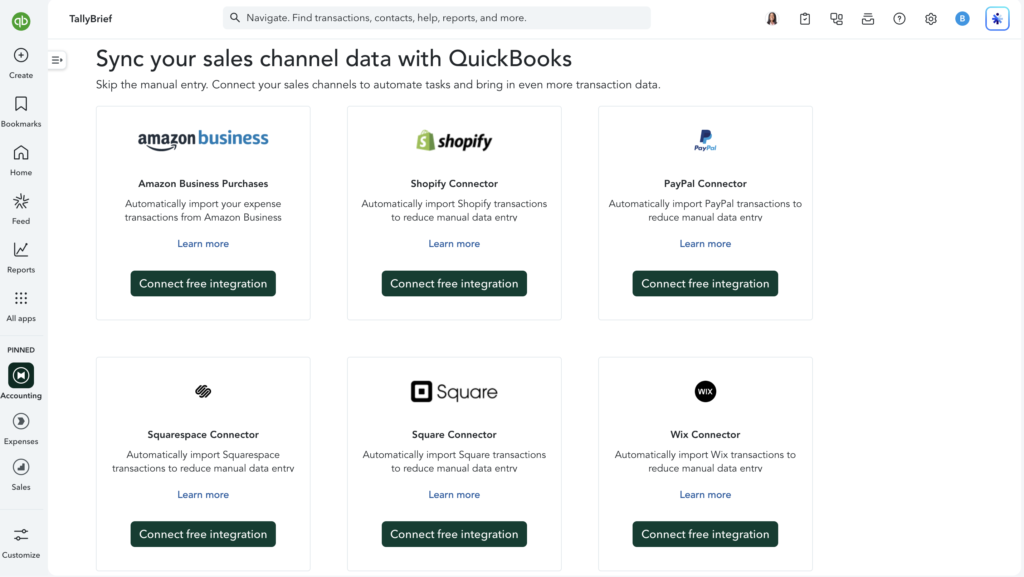
Intuit’s own sales channel connectors, as shown in our Lite account.
Advantages
- Huge app marketplace with user ratings
- Intuit-built connectors for major payment and ecommerce platforms
- Most freelancer tools already integrate with QuickBooks
Limitations
- Sales channel connections are listed as a Simple Start feature
- We didn't test any connections
- Third-party app quality varies (Intuit warns you to review them carefully)
Our take: If a tool you rely on works with any accounting software, it almost certainly works with QuickBooks. Just check whether it needs a pricier plan.
Mobile App
The QuickBooks mobile app (we tested on iPhone) was the pleasant surprise of our testing, and we found the experience much better on the app than on the website. Signing in was effortless: the app recognized our email and let us in with a passkey, no password needed. A short setup asked whether this was our main income, whether anyone works with us and what we wanted to start with.
It feels simpler and more approachable than the desktop version. The home screen shows what matters: items needing attention, bank balances, unpaid invoices, this month’s spending by category, and profit and loss. A single + button reaches invoices, receipts, expenses, estimates, bills and mileage trips. Everything we’d done on the website was there, including our invoices (with their “Viewed” status and a Send reminder button) and all 20 bank transactions.
Most importantly, creating and sending a new invoice worked on the phone while it was stuck loading on the website. Line items can be priced by quantity, hourly or flat rate, which is handy for freelancers (we billed 3 hours at $100), the email is pre-written, and you can preview the PDF with your logo before sending. After sending, the app offers to take payment on the spot, including Tap to Pay on iPhone, but to actually receive money you’ll need to finish QuickBooks Payments setup (deposit account, business and personal details).
Receipt capture is quick: the camera crops the receipt automatically, and the app read most details correctly, though our receipt in Qatari riyals was recorded as dollars because the account is set up in USD. You have to choose how you paid and a payment account before saving. The app also showed a limit we couldn’t find on Intuit’s plan page: Lite allows 2 bank connections.
Mileage tracking was effortless: all we had to do was set the app’s location access to “Always”. From then on it logged our drives in the background (two trips of 7.06 and 10.26 miles over two days), each with a map, start and end times and a potential tax deduction worked out for us (about 76¢ a mile). Trips land in an Unreviewed list for you to confirm and only count toward your yearly deduction total once reviewed, and the app prompts you to add your vehicle details for tax time.
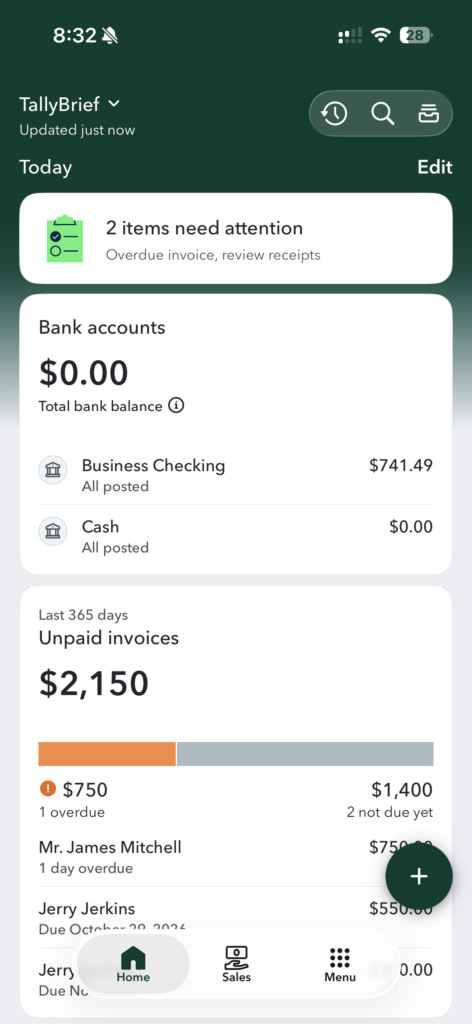
The app’s home screen: what needs attention, bank balances and unpaid invoices at a glance.
Advantages
- Much simpler and more approachable than the website
- Invoicing worked when the website's didn't
- Hourly, flat-rate or quantity pricing on invoices
- Effortless automatic mileage tracking with deduction estimates
- Fast receipt capture with auto-crop, plus Tap to Pay on iPhone
Limitations
- Receipts need payment details before saving
- Receipts are titled by their first line item instead of the shop name
- Trips must be reviewed before they count toward your deduction
- Payments need a full setup before you can get paid
Our take: The mobile app is the best way to use QuickBooks Solopreneur day to day. It’s simpler than the website, tracks mileage on its own, and kept invoicing working when the website didn’t.
Day-to-Day Experience
Day-to-Day Experience
Once it was set up, QuickBooks mostly ran itself. Over two weeks, our routine settled into a simple rhythm: glance at the dashboard, approve new bank transactions and fix the few suggestions it got wrong. The automation pulled its weight: categories appeared minutes after each import, one rule took care of a recurring subscription, receipts were read in about 30 seconds, and the phone logged our mileage without us lifting a finger.
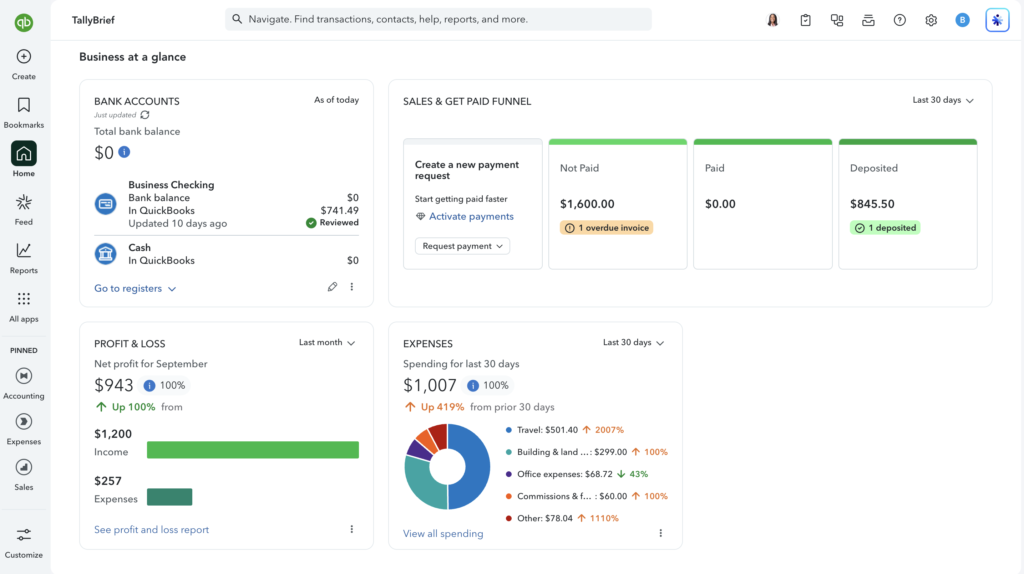
Our QuickBooks Solopreneur Lite dashboard after two weeks of test data.

What never went away was the noise. Upgrade prompts sit behind Payroll, budgets and custom reports, the Lending section advertises loans, and pop-ups suggest add-ons. We were signed out more than once mid-session, some screens took several seconds to load, and twice the new-invoice screen didn’t load at all. None of it stopped the work for long, especially with the app as a backup, but it makes a $20 tool feel like a shop window for Intuit’s bigger plans.
Strengths and Weaknesses
Strengths and Weaknesses
Strengths
- Excellent tax prep: a Schedule C summary, a deduction finder and automatic mileage
- A mobile app that's simpler than the website, and kept working when the website didn't
- Fast, accurate receipt capture and mostly accurate auto-categorization
- Recurring billing and reminders included on a $20 plan
- Room to grow into bigger QuickBooks plans without switching software
- A huge app marketplace
Weaknesses
- A busy website built for businesses with staff, with constant upgrade prompts
- The website's new-invoice screen stopped working twice in two weeks
- Live chat support never reached a human
- Only three reports; budgets and custom reports are locked
- One user only, with no accountant access
- No free trial when upgrading from Free
Customer Support
Customer Support
This was the low point of our testing. When the website’s new-invoice screen stopped loading, we contacted support through the live chat in the help panel. An AI assistant answered first, then put us in a queue for a human expert.
After more than an hour, no expert had joined, and the chat wouldn’t let us type while we waited. When we refreshed the page, the chat closed with a message saying an expert couldn’t reach us because we hadn’t responded, even though there had been no way to respond. The invoice problem cleared up on its own after about two days, then came back later in our testing. Lite’s checkout page promises “human phone and chat support”; we didn’t try phone, but chat didn’t deliver. ZipBooks, by contrast, fixed both problems we raised with its support team during our testing.
Support Channel
What We Found
✓Live Chat
AI assistant first; 1+ hour wait with no human expert, then the chat closed itself
−Email Support
No email support
✓Phone Support
Listed for Lite; not tested
✓Help Center / Knowledge Base
Help articles searchable from the app, plus the Intuit Community forum
Our take: Don’t count on quick human help on Lite. Our chat never reached a person, so expect to rely on help articles and the community forum.
Alternatives
Alternatives to QuickBooks Solopreneur
If QuickBooks feels like more software than you need, or you’d rather not pay at all, these are worth a look.
ZipBooks
Best For
A free plan with simple accounting
We tested it hands-on: its free Starter plan covers many invoicing and bookkeeping basics, with a far simpler interface than QuickBooks, though it has far fewer integrations.

Wave
Best For
Free invoicing and accounting
Wave offers free invoicing and accounting with no invoice limit, a good fit if QuickBooks’ 2-invoice Free plan is too tight.
Review coming soon

FreshBooks
Best For
Client-friendly invoicing
FreshBooks is built around invoicing and client billing, with a cleaner interface but no free plan.
Review coming soon
Final Verdict
QuickBooks Solopreneur Lite is worth $20 a month for freelancers who want tax-ready books and are happy to work from their phone, but its cluttered website and unreliable support hold it back.
We’d recommend it, with conditions. For $20 a month, Lite does more than its plan page promises. The tax tools are the standout: a Schedule C-ready summary, a deduction finder that genuinely helps, and mileage that tracks itself and flows straight into your deductions. Receipt capture is accurate, bank transactions are mostly categorized for you, and invoicing includes recurring billing and automatic reminders. The mobile app ties it together, and it’s how we’d use QuickBooks day to day.
The conditions are real, though. Under the hood, Lite is QuickBooks Online, built for businesses with employees, stock and payroll: that gives you room to grow, but on the website it means menus, settings and upgrade prompts you’ll never need. Reporting is thin, there’s no accountant login, the website’s invoice screen failed twice during our testing, and our support chat never reached a human. If you mainly want simple invoicing, ZipBooks was easier to live with in our testing. Otherwise, start on the Free plan, test invoicing on the website before relying on it, and upgrade when the 2-invoice limit starts to bite.
Ideal Customer
US freelancers who want tax-ready books
Main Strength
Tax-ready books and a great mobile app for $20/month
Main Limitation
Cluttered website built for bigger businesses
QuickBooks Solopreneur · from $0/mo