
PRICING GUIDE
Expensify Pricing (2026): Which Plan Is Right for You?
Expensify pricing looks simple on the plan page, but what you actually pay depends on your plan, whether you sign a yearly contract and how much you use the Expensify Card. Here’s what freelancers and small businesses really pay, and which plan makes sense.
By TallyBrief Editorial Team · Last updated November 2026 · 12 min read
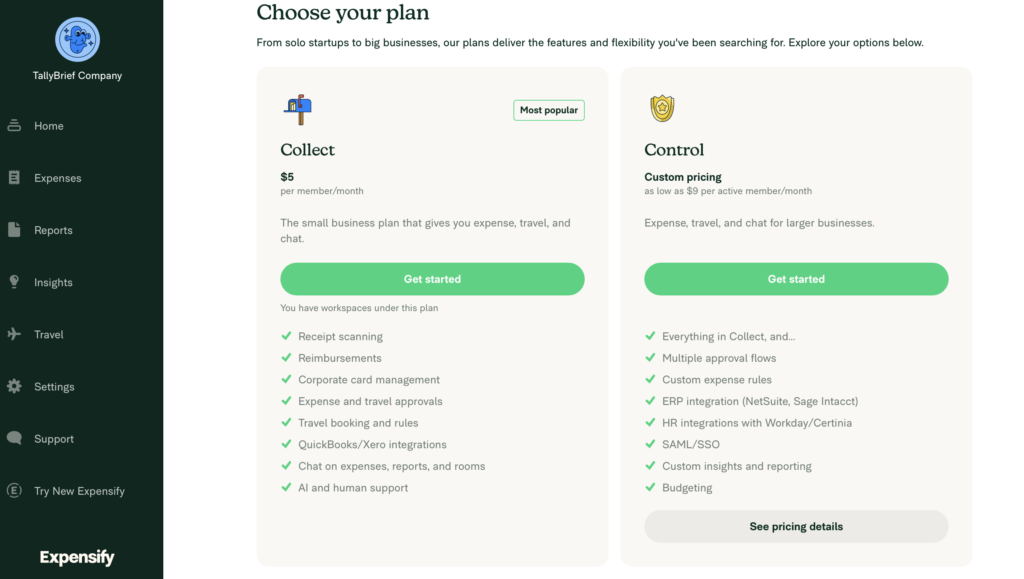
Expensify’s paid plans as shown inside our account (US), November 2026.
Quick Answer
For most freelancers, the free plan is enough.
Expensify pricing comes down to three plans: Submit, which is free, and two paid plans, Collect and Control. For most freelancers and small businesses, the real cost is $5 per person per month on Collect, or $36 per person per month on Control, with no yearly contract.
You’ll see Control advertised at $9, but that’s the best case. A yearly contract brings it down to $18, and you only get $9 if you also put at least half of your expenses in Expensify on the Expensify Card, Expensify’s own company card.
The free plan covers the basics well: unlimited receipt scanning, mileage tracking and expense reports. What it lacks is the business side, such as approvals and a connection to your accounting software.
Collect is the best value for small businesses. For $5 per person a month with no contract, it adds approvals, reimbursements and a direct connection to QuickBooks Online and Xero, whether that’s just you or the whole team. Control is only worth it if you need more complex approval rules, such as more than one person signing off on spending.
Pricing at a Glance
Expensify Pricing at a Glance
Expensify pricing covers three plans, from the free Submit plan to Control at up to $36 per active member a month. Collect is the plan most small businesses need.
Plan
Cost per person, per month
Who you pay for
Best for
Submit
Free
No one, it’s free
Tracking your own receipts and mileage
Collect
$5, no contract
Everyone you add
Freelancers and teams who want expenses sent straight to QuickBooks or Xero
Control
$36 with no contract
$18 with a yearly contract
$9 with a yearly contract and the Expensify Card
People who used it that month, or every seat on a yearly contract
Teams that need more complex approvals or use larger accounting systems (ERPs)
Note: Figures are US prices from Expensify’s pricing page and its billing help article, checked in November 2026. Collect pricing applies to workspaces created on or after April 1, 2025. Control’s $9 rate needs an annual subscription, with at least half of your approved US-dollar expenses in Expensify on the Expensify Card that month. Using the card for less earns a smaller discount.
Who This Guide Is For
Is This Guide Right for You?
This guide is for freelancers and small US businesses weighing up Expensify for receipts, mileage, reimbursements and approvals, who want to know what they’ll really pay. If you mainly need invoicing and bookkeeping with receipt capture built in, see our QuickBooks Solopreneur pricing guide instead.
- Freelancers wondering whether Expensify’s free plan is enough
- Small business owners who pay employees back for expenses
- Teams deciding between Collect and Control
- Anyone confused by “active member” vs. “unique member” billing
How Pricing Works
How Expensify Pricing Works
Expensify charges per person, not per business. The free Submit plan costs nothing for anyone. Collect charges $5 a month for every member of your workspace, and Control charges for active members (people who create, submit, approve, reimburse or export an expense report that month), or for every seat you sign up for on a yearly contract. The price per person is $36, $18 or $9, depending on whether you sign a yearly contract and use the Expensify Card.
Collect: You Pay for Every Member
Collect charges for every person you add to your workspace, even if they don’t submit a single expense that month. There’s no contract to sign: you pay month to month, and your bill goes up or down as you add or remove people. This price applies to workspaces created on or after April 1, 2025.
Control: Three Prices for the Same Plan
With no contract (Expensify calls this pay-per-use), Control costs $36 a month for each active member: anyone who creates, submits, approves, reimburses or exports an expense report that month. An annual subscription drops that to $18. If you have an annual subscription and put at least half of your expenses in Expensify on the Expensify Card, it drops again to $9.
The catch with the annual subscription is that you pay for every seat you signed up for, even in months some people don’t use Expensify, and you can’t lower that number until the year ends. You can add people at any time. Anyone above your seat count is billed at $36. For example, if you sign up for 10 people and 12 are active one month, the extra two cost $36 each.
What the Free Plan Really Includes
For a freelancer tracking their own expenses, the free plan does a lot. You get unlimited receipt scanning, mileage tracking and expense reports, you can import transactions from your own credit card, and you can sort expenses with categories and tags. What you don’t get is the business side: approvals, reimbursements and a connection to QuickBooks or Xero all start on Collect.
The Expensify Card Can Lower Your Bill
For most small businesses, the Expensify Card’s main perk is 1% cash back on US purchases. The 2% rate only starts at $250,000 a month in spending. Cash back goes toward your Expensify bill first, and anything left over is paid to your bank account. On Control, the card is also how you get the lowest price.
Good to Know
Prices in this guide were checked against Expensify’s pricing page and its billing help article in November 2026. We also set up an Expensify account and checked the billing rules with Expensify’s support team. Expensify has changed its plans several times in recent years, so confirm the final price in your account before you commit. See how TallyBrief tests and researches software.
Plan Comparison
Expensify Plans Compared
Expensify’s three plans build on each other: Collect includes everything in Submit, and Control includes everything in Collect. Here’s what each one adds and who it’s for.
Submit
$0 per member (free for everyone)
BEST FOR: Freelancers who only need to scan receipts and track mileage for tax time.
Submit is Expensify’s free plan for individuals. You can scan as many receipts as you like, track mileage and build expense reports. What it doesn’t include is the business side: there’s no approval workflow and no connection to QuickBooks Online or Xero, which start on Collect.
Key reasons to choose it
- $0 for every member
- Unlimited SmartScans (receipt scanning)
- Mileage tracking
- Expense reports
- Categories and tags
- Personal card import
- Chat and support on every expense
Collect
$5 per member per month (month to month)
BEST FOR: Freelancers and small businesses that want expenses synced to QuickBooks Online or Xero, or need to approve and reimburse employees.
Collect is the plan Expensify says most businesses start on. It adds the business tools: expense and travel approvals, reimbursements, corporate card management and direct connections to QuickBooks Online and Xero. For a freelancer working alone, that’s $5 a month, or $60 a year.
Key reasons to choose it
- $5 per member a month, no annual contract
- QuickBooks Online and Xero integrations
- Expense and travel approvals
- Reimbursements by ACH
- Corporate card management
- Travel booking with rules
Control
$9 to $36 per active member per month
BEST FOR: Larger teams that need multi-step approvals, custom expense rules, or a NetSuite or Sage Intacct connection.
Control is built for larger businesses. On top of Collect, it adds multiple approval flows, custom expense rules, ERP integrations such as NetSuite and Sage Intacct, HR integrations, SAML/SSO, budgeting and custom reporting. Expensify lists it as custom pricing from $9 per active member, but that rate needs an annual subscription and heavy use of the Expensify Card.
Key reasons to choose it
- Multiple approval flows
- Custom expense rules
- NetSuite and Sage Intacct integrations
- Workday and Certinia HR integrations
- SAML/SSO
- Budgeting and custom insights
What It Costs
What Will Expensify Actually Cost You?
Scenario 1: The Solo Freelancer
Who it suits: A freelancer or sole proprietor who works alone and wants every receipt captured for tax time.
Submit covers this for free: scan receipts as you go, log your mileage and build an expense report when it’s time to do your taxes.
Actual cost: $0 on Submit, or $60 a year on Collect if you want your expenses to flow straight into QuickBooks Online or Xero.
Bottom line: Start on Submit. Pay for Collect only once retyping expenses into your accounting software starts costing you time.
Scenario 2: The Small Business With 5 Employees
Compare: Collect with everyone added vs. only the people who spend
Who it suits: An owner with five employees who sometimes pay for supplies or travel and need to be paid back.
Collect, 6 members — $360 a year
You plus five employees is six members at $5, or $30 a month. Everyone you add counts, even in months they submit nothing.
Collect, 4 members — $240 a year
If two of the five never spend company money, leaving them out of the workspace brings it to four members and $20 a month.
The pricing decision: Collect is the right plan here. Keep your member list to the people who actually submit expenses, because Collect bills everyone on it.
Scenario 3: The Growing Team of 15
Compare: Collect vs. Control
Who it suits: A company with 15 people submitting expenses every month that’s wondering whether it needs Control’s advanced approvals.
Collect — $900 a year
Fifteen members at $5 is $75 a month, with no contract. That covers approvals, reimbursements and QuickBooks Online or Xero sync.
Control — $1,620 to $6,480 a year
At the $9 rate (annual plan, with at least half of your expenses in Expensify on the Expensify Card), 15 active members cost $1,620 a year. Without the card it’s $3,240, and pay-per-use with no commitment is $6,480.
The pricing decision: Collect costs less, even against Control’s best rate. Move to Control only if you need multi-step approvals, custom rules or a connection to a larger accounting system like NetSuite.
Common Mistakes
Mistakes to Avoid
Even once you understand the plans and how Expensify pricing works, a few billing rules catch people out. Here’s what to watch for.
Paying for Collect Before You Need It
Expensify’s free plan scans unlimited receipts. If you work alone and just want receipts captured for tax time, Collect’s $5 a month buys features you may never use.
Better Approach
Start on Submit, and upgrade only when you want approvals, reimbursements or a QuickBooks Online or Xero connection.
Paying for People Who Never Spend
Collect bills for every member of your workspace, whether or not they submit anything that month.
Better Approach
Check your member list each month and remove people who no longer submit expenses. Your bill adjusts as your member count changes.
Committing to an Annual Control Plan Too Early
On an annual Control subscription, you can add people at any time but can’t lower your committed number until the term ends. Anyone above your commitment is billed at $36 a month.
Better Approach
Set your commitment at the number of people you’re sure will be active all year, not your best-case headcount.
Counting on the $9 Rate Without the Card
Control’s $9 price applies only on an annual plan, and only in months when at least half of your expenses in Expensify go on the Expensify Card. Below that, the discount shrinks, and with no card use the rate is $18.
Better Approach
Budget at $18 per active member, and count the $9 rate as a saving only if your team will really move its spending onto the Expensify Card.
TallyBrief Recommendation
Start on the free plan. Pay for Collect only when you need accounting sync or approvals. Most small businesses never need Control.
For most freelancers, Expensify’s free Submit plan is enough: unlimited receipt scanning and mileage tracking cost nothing. Collect, at $5 per member per month, is worth it once you want expenses flowing into QuickBooks Online or Xero, or need to approve and reimburse employees.
Control makes sense only for larger teams that need multi-step approvals, custom rules or ERP integrations. Even then, the budget is $18 per active member unless your team will put most of its spending on the Expensify Card.
If you’d rather have receipts, mileage and invoicing in one app, read our QuickBooks Solopreneur pricing guide. Its Lite plan, at $20 a month, includes unlimited receipt capture and mileage tracking alongside invoicing and tax-time reports.
FAQ
Frequently Asked Questions
Expensify pricing has three plans: Submit is free, Collect costs $5 per member per month, and Control costs $9 to $36 per active member per month, depending on whether you commit for a year and use the Expensify Card.
Yes. The free Submit plan includes unlimited receipt scanning, mileage tracking, expense reports, and categories and tags. Approvals, reimbursements and accounting connections need a paid plan.
Collect ($5 per member) covers approvals, reimbursements, corporate cards, travel booking and QuickBooks Online or Xero sync. Control adds multiple approval flows, custom rules, ERP integrations such as NetSuite and Sage Intacct, SAML/SSO and budgeting, and it’s priced per active member.
On Control, an active member is anyone who creates, submits, approves, reimburses or exports a report during the month, including copilots. Collect works differently: it bills every member you add, active or not.
Yes. When we created a workspace, Expensify started a 30-day free trial of the Collect plan straight away, with no payment card needed. To keep Collect’s features after 30 days, you add a card. If you only need to track your own expenses, the free Submit plan stays free.
Only on Control. An annual subscription cuts the price from $36 to $18 per person, and to as low as $9 with the Expensify Card. You pay for everyone you signed up for, active or not. Collect has no annual option for new accounts.
No. Every plan works without it. The card earns 1% cash back on US purchases (2% once monthly spend passes $250,000), which is applied to your Expensify bill, and on Control it unlocks the $9 rate.
Yes, from the Collect plan up. Collect connects to QuickBooks Online and Xero, and Control adds ERP integrations such as NetSuite and Sage Intacct. The free Submit plan doesn’t include accounting integrations.
Ready to Choose Your Expensify Plan?
When it comes to Expensify pricing, start on the free Submit plan, move to Collect once you need accounting sync or approvals, and consider Control only for a larger team with complex rules.
TallyBrief may earn a commission if you purchase through links on this page. This does not affect our editorial recommendations.